
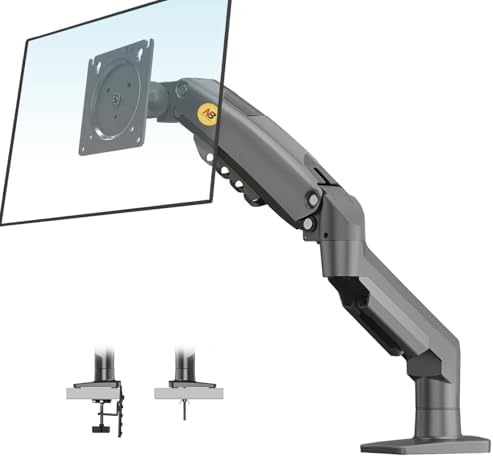

The Ergotron LX runs $150-200. The North Bayou F80 is currently unavailable. On paper that gap looks like a gimmick. In practice, each arm solves a different problem, and choosing between them comes down to what you're actually mounting, how often you'll move it, and how long you expect the arm to last.
Short version: the Ergotron is the right call if your monitor is heavy, large, or repositioned often. The North Bayou is the right call if your monitor is under 15 lbs and you set the height once. The rest of this page is the longer version, with real specs and no invented numbers.
How they compare on paper
Every other spec can shift between revisions, but five numbers drive the decision: weight capacity, maximum monitor size, warranty, the spring mechanism, and price.
| Ergotron LX | North Bayou F80 | |
|---|---|---|
| Weight capacity | 7 to 25 lbs | 4.4 to 19.8 lbs |
| Max monitor size | Up to 34" | Up to 30" |
| Spring mechanism | Constant Force | Gas spring |
| Construction | All-metal | Aluminum + plastic trim |
| Cable management | Integrated channels | Clip-on guides |
| Warranty | 10 years | 1 to 2 years (seller-dependent) |
| Price | $150-200 | unavailable |
Will it hold your monitor?
Weight capacity is where the budget arm fails before anything else. The F80 is rated to 19.8 lbs on screens up to 30 inches. The LX is rated to 25 lbs on screens up to 34. That's the boundary line.
| Monitor | Weight (no stand) | Ergotron LX | North Bayou F80 |
|---|---|---|---|
| Dell S2722QC (27" 4K) | 10.4 lbs | Yes | Yes |
| Apple Studio Display (27" 5K) | 13.5 lbs | Yes | Yes |
| LG 34WN80C-B (34" ultrawide) | 15.2 lbs | Yes | At limit · over F80's 30" size rating |
| Dell U3223QE (32" 4K) | 18.1 lbs | Yes | Near F80's 19.8 lb ceiling |
| Samsung Odyssey G7 (32" curved) | 18.5 lbs | Yes | At F80's weight ceiling |
| LG 38WN95C-W (38" ultrawide) | 21.6 lbs | No · under-rated | No · under-rated |
| Samsung Odyssey G9 (49" super-ultrawide) | 31.3 lbs | No · needs heavy-duty arm | No · needs heavy-duty arm |
The Ergotron LX
The LX has been the category reference for over a decade. The reason it hasn't been displaced is the Constant Force spring. Gas-spring arms hold position by compressing a sealed cylinder, and that cylinder loses pressure over years of use. The LX uses a mechanical spring instead, which doesn't degrade. Once you set the height, it stays there. No drift, no seasonal retensioning.
The rest of the build follows from that choice. Arm segments and VESA plate are polished aluminum and steel with no structural plastic. The desk clamp tightens with a single bolt. Cable management runs through integrated channels inside the arm rather than clipped on the outside. A 10 year warranty backs it.
What the marketing glosses over: the 25 lb ceiling doesn't cover 38 inch ultrawides or 49 inch super-ultrawides. If that's your display, the Ergotron HX is the correct arm. The polished aluminum finish also shows fingerprints. The matte black option is worth the small upcharge on a dark desk. And the desk clamp needs about 2.4 inches of rear clearance, which matters if your desk sits flush against a wall.
The North Bayou F80
The F80 is the reason most people don't actually need an LX. For a 24 or 27 inch monitor under 15 lbs, it does the work. It clamps to the desk, lifts the screen off the surface, and gives you height, tilt, swivel, and rotation. The gas spring is smooth out of the box and holds position once you dial in the tension. Seventeen thousand reviews on Amazon at 4.5 stars is not a fluke.
What the price tells you honestly: the F80 is rated to 19.8 lbs on displays up to 30 inches, and many 32 inch panels weigh more than that. Gas springs can lose pressure after two to five years of heavy use, so this is a replaceable arm rather than a lifetime investment. The cable management is clip-on rather than channeled, which works but leaves cables more visible. Plastic trim covers some of the joints, which is the compromise that makes the price possible.
A middle-ground option
If neither pick fits cleanly, the Amazon Basics Premium Monitor Arm sits between them. Better build than the F80 and a longer warranty, but still a gas spring rather than a Constant Force mechanism. A reasonable compromise when the F80 feels too light and the LX is more arm than the setup needs.
Which one to buy
Choose the Ergotron LX if your monitor is 32 inches or larger, weighs over 18 lbs, or you reposition the screen multiple times a day. Same call if you plan to keep the arm for five or more years and want the warranty coverage that only comes with the premium tier.
Choose the North Bayou F80 if you're mounting a single 24 or 27 inch monitor under 15 lbs and you set the position once. Same call if you're outfitting on a tight budget, renting, or would rather replace the arm in four years than pay the premium up front.
If you fall in between, the Amazon Basics Premium is the practical compromise, and the full monitor arm guide covers a few other options worth considering, including the UPLIFT Desk Range-X at $139 with a 15 year warranty.
Frequently Asked Questions
Is the North Bayou F80 actually sturdy enough for daily use?
Yes, for monitors within its 19.8 lb weight range. The F80 holds position, moves smoothly, and doesn't wobble during normal use. Where it falls short of the Ergotron LX is long-term gas spring durability and maximum weight ceiling. For a standard 24 to 27 inch display weighing 8 to 15 lbs, the F80 is adequate.
Will the F80 hold a 32 inch monitor?
It depends on weight, not size. Many 32 inch displays weigh 18 to 22 lbs, which puts them at or over the F80's 19.8 lb ceiling. Check your monitor's spec sheet for weight without the stand. Under 19.8 lbs, the F80 works. Over that or above a 30 inch screen size, the Ergotron LX is the safer pick.
Does the Ergotron LX work with curved monitors?
Yes. The LX uses the standard 75x75mm or 100x100mm VESA mounting pattern, which is the same on curved and flat monitors. Curvature has no effect on compatibility. Just verify your curved monitor weight falls within the 7 to 25 lb capacity.
Can I mount two monitors on either arm?
No. Both the Ergotron LX and North Bayou F80 are single-monitor designs. For dual setups, buy two individual arms or use a dedicated dual-arm mount.
Do these arms require drilling into my desk?
Not for the default installation. Both include a C-clamp that grips the desk edge with no permanent modification. Each also includes a grommet mount if you prefer to route the arm through a hole, but the clamp is what most people use.
Is the warranty difference worth paying for?
The Ergotron LX carries a 10 year manufacturer warranty. The North Bayou F80 typically ships with 1 to 2 year coverage that varies by seller. If you plan to keep the arm for five or more years and want guaranteed replacement for spring failure, the LX warranty is the clearest justification for the price gap.
Related Guides
- Best Monitor Arms for Desk Space: Compare these arms with UPLIFT and heavy-monitor alternatives
- Best Monitor Arms Under $150: Budget dual arms and laptop-plus-monitor mounts
- Multi-Monitor Desk Setup Guide: Plan arm placement, layout, and cable routing for two or more screens
- How to Set Up Dual Monitors: Configure display order, scaling, and positioning after mounting
- Desk Cable Management Setup Guide: Route power and video cables along the arm and desk