

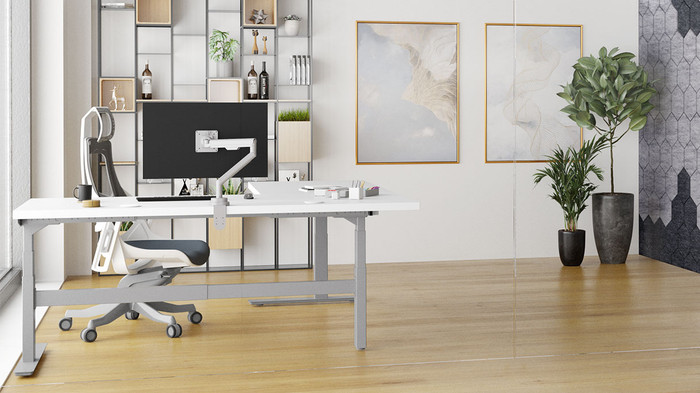


The best space-saving monitor arm does two jobs at once: it lifts your screen to eye level and gives back the desk space buried under the stock stand. A quality arm clamps to the back of your desk, floats the display off the surface, and gives you control over height, depth, tilt, and rotation. The Ergotron LX delivers the smoothest overall experience for most users, while the Range-X by UPLIFT Desk is the strongest warranty pick if you want a monitor arm that fits naturally into an UPLIFT workstation.
Best overall: The Ergotron LX ($150-200) is the benchmark. Constant Force spring, all-metal build, 10-year warranty.
Best mid-range: The Range-X by UPLIFT Desk ($139) matches the Ergotron on reach and adjustment with the UPLIFT Desk 15-year warranty.
Best value: The Zilker by UPLIFT Desk ($99) with quick-release VESA clip for easy monitor swaps.
Best budget: The North Bayou F80 (unavailable) covers the basics at a quarter of the premium price.
Best expandable: The Moontower by UPLIFT Desk ($79) scales from 1 to 6 monitors on one pole.
Quick Comparison
| Arm | Price | Best For | Weight Capacity | Warranty | Spring Type |
|---|---|---|---|---|---|
| Ergotron LX | $150-200 | Premium pick | 7-25 lbs | 10 years | Constant Force |
| Range-X (UPLIFT) | $139 | Best warranty | 3.75-17.6 lbs | 15 years | Gas spring |
| Zilker (UPLIFT) | $99 | Quick-swap | 4.4-11 lbs | N/A | Gas spring |
| Moontower (UPLIFT) | $79 | Multi-monitor | 14.3-17.6 lbs | N/A | Gas spring |
| North Bayou F80 | unavailable | Budget | 4.4-19.8 lbs | 1-2 years | Gas spring |
| Ergotron HX | $350-400 | Ultrawide/heavy | 20-42 lbs | 10 years | Constant Force |
Our Top Picks
Ergotron LX Single Monitor Arm: Best Overall Pick
The Ergotron LX has been the benchmark monitor arm for over a decade, and nothing in the market has displaced it. Where most arms rely on gas cylinders that gradually lose pressure over months and years, the Ergotron LX uses a patented Constant Force spring mechanism that maintains precise tension indefinitely. You set the height, and it stays there without drift, sag, or the need for periodic readjustment.
Every component on the LX is metal. The arm, the pole, the pivot joints, and the VESA plate are all constructed from polished aluminum and steel. There's no plastic in the load-bearing structure. This all-metal build translates directly to stability; the arm doesn't wobble when you tap the screen, reposition it, or bump your desk.
- Weight Capacity: 7 to 25 lbs, covering virtually all monitors up to 34 inches
- VESA Compatibility: 75x75mm and 100x100mm (standard for nearly all monitors)
- Vertical Range: 13 inches of height adjustment
- Horizontal Reach: Up to 24 inches from the mounting point
- Tilt: 70 degrees back, 5 degrees forward
- Rotation: 360-degree at the VESA plate for portrait/landscape switching
- Pan: 360 degrees at all pivot points
- Mounting Options: Desk clamp (up to 2.4-inch thick surfaces) or grommet mount included
- Construction: Polished aluminum and steel throughout, no plastic structural components
- Warranty: 10-year manufacturer warranty
- Amazon Rating: 4.6 out of 5 stars with over 14,000 reviews
- Street Price: $150-200
Why the Ergotron LX Wins
The Constant Force spring is the defining advantage. Gas springs, which are used in nearly every competing arm, work by compressing a sealed gas cylinder. Over time, that seal can degrade, pressure drops, and the arm starts to drift or sag. You end up retightening bolts or propping the monitor with books. The Ergotron LX eliminates this failure mode entirely. Its mechanical spring maintains consistent tension across the full range of motion for the life of the product.
Cable management is handled by integrated routing channels that run the length of each arm segment. Your power cable, HDMI or DisplayPort cable, and USB cables all tuck neatly into these channels, keeping them invisible and preventing them from snagging during repositioning.
Installation takes about 15 minutes. The desk clamp tightens with a single bolt and pads the desk surface to prevent scratching. The arm snaps onto the pole, and the VESA plate bolts to the back of your monitor with four screws. Tension adjustment uses a single hex bolt on the arm elbow, allowing you to dial in the exact resistance for your monitor weight so the arm holds position without being stiff to move.
Buying Tips
- The 25-lb upper limit excludes some 38-inch and larger ultrawide monitors. For those, see the Ergotron HX below
- Arm segments are polished aluminum, which can show fingerprints. Matte black finish is available
- The desk clamp requires 2.4 inches of rear desk clearance
North Bayou F80 Monitor Arm: Best Budget Pick
The North Bayou F80 proves you don't need to spend $150 or more to get a functional, full-motion monitor arm. At unavailable, it costs roughly one-quarter the price of the Ergotron LX, yet it covers the core requirements: it clamps to your desk, lifts the monitor off the surface, and provides height, tilt, swivel, and rotation adjustment. For home office workers who want to free up desk space and improve screen positioning without a premium investment, the F80 is a legitimate option.
The F80 uses a gas spring mechanism rather than a mechanical spring. This is the standard approach at this price tier and it works well out of the box. The gas spring provides smooth motion and holds position under load. The trade-off is longevity: gas springs can lose pressure over 2 to 5 years of heavy use, potentially causing gradual drift. For the price, most users can simply replace the entire arm if this ever becomes an issue.
- Weight Capacity: 4.4 to 19.8 lbs, suitable for most monitors 17 to 30 inches
- VESA Compatibility: 75x75mm and 100x100mm
- Vertical Range: Approximately 15 inches of height adjustment from the desk surface
- Tilt: -30 to +85 degrees (115 degrees total)
- Swivel: 90 degrees left and right (180 degrees total)
- Rotation: 360 degrees at the VESA plate for portrait/landscape switching
- Mounting: Desk clamp (supports surfaces up to approximately 2.4 inches thick) or grommet mount
- Construction: Aluminum alloy arm with some plastic trim and covers
- Cable Management: Integrated cable clips along the arm
- Amazon Rating: 4.5 out of 5 stars with over 17,000 reviews
- Street Price: unavailable
Where the F80 Delivers
At this price point, the F80 handles the fundamentals well. The gas spring moves smoothly and holds position without tools once you set the initial tension. Installation follows the same general process as the Ergotron: clamp to desk, attach arm to pole, bolt VESA plate to monitor. Most users report setup time of 10 to 20 minutes.
The cable management uses clip-on guides rather than the integrated channels found on the Ergotron. They work, but cables are more visible and can pop out of the clips if you reposition the arm aggressively. It's functional cable management, not invisible cable management.
The 17,000-plus Amazon reviews at 4.5 out of 5 stars speak to the F80's real-world reliability. For the vast majority of standard monitors in the 24 to 27-inch range that weigh under 15 lbs, the F80 provides stable, adjustable mounting without any deal-breaking compromises.
Ergotron LX vs. North Bayou F80: The Real Difference
The price gap between these two arms is real, and the question most buyers face is whether the Ergotron's premium is justified.
The Ergotron LX is worth the extra money if you plan to keep the arm for 5 or more years, use a heavier monitor (20 lbs or above), reposition your screen frequently throughout the day, or value the security of a 10-year warranty and guaranteed zero drift.
The North Bayou F80 makes more sense if you're outfitting a home office on a budget, your monitor weighs under 15 lbs, you set the position once and rarely change it, or you'd rather spend $40 now and replace it in 3 to 5 years if needed rather than invest $175 upfront.
The dedicated Ergotron LX versus North Bayou F80 comparison puts the two weight ranges, spring systems, warranties, and monitor-fit boundaries in one decision table.
The Range-X by UPLIFT Desk splits the difference at $139 with a 15-year warranty that exceeds both the Ergotron (10 years) and the F80 (1-2 years). See below.
Ergotron HX: For Ultrawide and Heavy Monitors
If you use a 38-inch or larger ultrawide monitor, or any display that weighs more than 25 lbs, neither the LX nor the F80 will work. The Ergotron HX is purpose-built for these oversized, heavy displays.
- Weight Capacity: 20 to 42 lbs
- Screen Size: Up to 49 inches
- Vertical Range: 11.5 inches of height adjustment
- Tilt: 70 degrees back, 5 degrees forward
- Pan: 360 degrees
- Construction: Reinforced aluminum and steel with broader pivot points
- Street Price: $350 to $400
The HX uses the same Constant Force spring technology as the LX but with a heavier-duty mechanism rated for nearly double the weight. If you've invested $800 or more in an ultrawide display, the HX is the only arm in the consumer market that can securely support it while providing full articulation. The higher price is justified by the engineering required to hold 42 lbs at full extension without drift.
Range-X Single Monitor Arm by UPLIFT Desk: Best Mid-Range
The Range-X Single Monitor Arm by UPLIFT Desk slots between the Ergotron LX and the budget picks in both price and capability. At $139, it supports monitors from 3.75 to 17.6 lbs with 13.2 inches of height adjustment and a 26.3-inch forward reach. The standout spec is the UPLIFT Desk 15-year warranty, which is the longest of any arm in this guide.
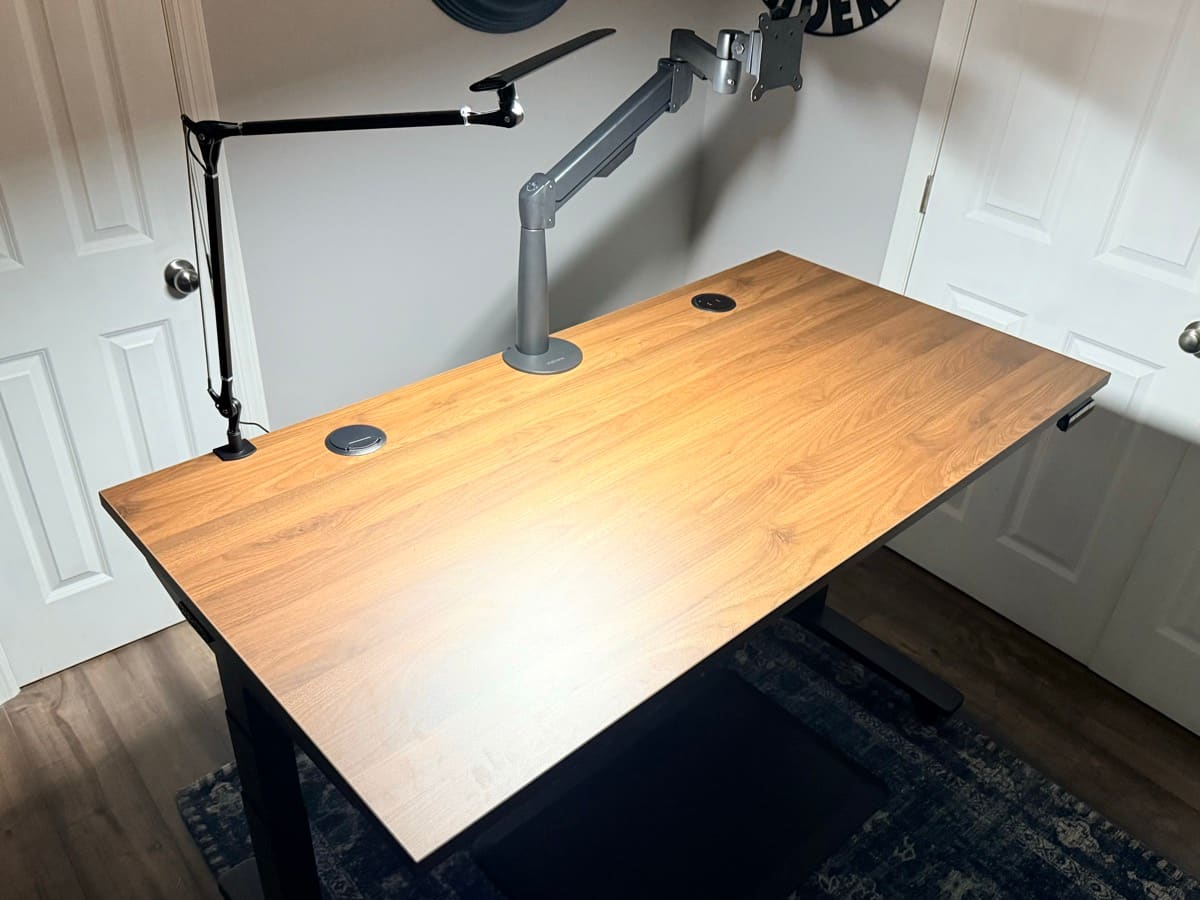
Mounted on the UPLIFT V3 Standing Desk, the build quality holds up well alongside the Ergotron LX. Owners note the gas spring is smooth, repositioning is easy with one hand, and the arm doesn't drift. The 15-year warranty from UPLIFT Desk gives it an edge over the Ergotron's 10-year coverage at a lower price.
- Weight Capacity: 3.75 to 17.6 lbs
- VESA Compatibility: 75x75mm and 100x100mm (optional 200x100mm adapter, +$19)
- Height Adjustment: 13.2 inches (8.5" to 21.7" from desk)
- Horizontal Reach: 26.3 inches
- Tilt: +90 degrees / -45 degrees
- Pan: 180 degrees
- Rotation: 360 degrees for portrait/landscape
- Mounting: Clamp (0.75-3.75" desks) or bolt-through
- Warranty: UPLIFT Desk 15-year warranty
- Price: $139
The Range-X is a strong alternative to the Ergotron LX for anyone who wants long-term warranty protection without the $150-200 price tag. The UPLIFT Desk 15-year warranty actually exceeds the Ergotron's 10-year coverage. The weight limit of 17.6 lbs covers most monitors up to 32 inches comfortably.
Buying Tips
- The UPLIFT Desk 15-year warranty makes this the best long-term value in the guide
- Optional laptop mount accessory turns this into a laptop arm as well
- If you already own an UPLIFT V3 Standing Desk, the Range-X mounts into the desk's 48 threaded mounting points for a clean, integrated look
- Available through UPLIFT Desk with free shipping
Zilker Single Monitor Arm by UPLIFT Desk: Best Quick-Swap
The Zilker Single Monitor Arm by UPLIFT Desk is UPLIFT Desk's entry-level arm at $99. Its standout feature is the quick-release VESA clip that lets you snap a monitor on and off without tools. If you swap monitors between a desktop and a laptop setup, or rotate displays for different tasks, the Zilker saves time over traditional four-screw VESA plates.
- Weight Capacity: 4.4 to 11 lbs
- VESA Compatibility: 75x75mm and 100x100mm (optional 200x100mm adapter)
- Height Adjustment: 12.25 inches (6.75" to 19" from desk)
- Rotation: 360 degrees (with removable stop pin for 180-degree limit)
- Mounting: Clamp (0.75-3.75" desks) or bolt-through
- Cable Management: Integrated routing
- Price: $99
The 11 lb weight limit is the main constraint. It covers most 24-inch monitors and many 27-inch models, but heavier 27-inch and 32-inch displays will exceed it. Check your monitor's weight before buying.
Buying Tips
- Best for users who frequently attach and detach monitors thanks to the quick-release clip
- The rotation stop pin is a nice safety feature if you don't want the arm swinging past the desk edge
- At $99, it undercuts the Ergotron LX by $50-100 for lighter monitors
- Available through UPLIFT Desk with free shipping
Moontower Monitor Arm by UPLIFT Desk: Best Expandable
The Moontower Monitor Arm by UPLIFT Desk starts at $79 for a single arm and scales up to 2, 3, 4, or even 6 monitors on the same pole. That modularity makes it the pick for anyone planning to add screens over time without buying separate arms for each one.
- Weight Capacity: 14.3 to 17.6 lbs per arm
- Max Monitor Size: 27 inches
- VESA Compatibility: 75x75mm and 100x100mm (optional 200x100mm adapter)
- Rotation: 360 degrees
- Mounting: Clamp or bolt-through (0.39-3.46" desks)
- Construction: Powder-coated steel
- Cable Management: Wire management clips along the pole
- Price: $79 (single), $89 (dual), $119 (triple), $149 (quad), $189 (six)
The narrow weight range (14.3-17.6 lbs) means your monitor needs to fall in that specific window. Too light and the arm won't hold position; too heavy and it exceeds capacity. Most standard 27-inch monitors fall in this range, but verify your model's weight first.
Buying Tips
- Best value if you plan a multi-monitor setup. Adding screens to the same pole is cheaper than buying separate arms
- The powder-coated steel finish matches UPLIFT Desk desk frames for a cohesive look
- The 27-inch max means this isn't the pick for ultrawide monitors
- Available through UPLIFT Desk with free shipping
Full Comparison Table
| Feature | Ergotron LX | Range-X (UPLIFT) | Zilker (UPLIFT) | North Bayou F80 | Moontower (UPLIFT) | Ergotron HX |
|---|---|---|---|---|---|---|
| Price | $150-200 | $139 | $99 | unavailable | $79 | $350-$400 |
| Best For | Premium pick | Mid-range / best warranty | Quick-swap monitors | Budget buyers | Multi-monitor setups | Ultrawide / heavy |
| Spring Type | Constant Force | Gas spring | Gas spring | Gas spring | Gas spring | Constant Force |
| Weight Capacity | 7-25 lbs | 3.75-17.6 lbs | 4.4-11 lbs | 4.4-19.8 lbs | 14.3-17.6 lbs | 20-42 lbs |
| Max Screen Size | 34" | 32" | 27" | 30" | 27" | 49" |
| Vertical Range | 13" | 13.2" | 12.25" | ~15" | N/A | 11.5" |
| Horizontal Reach | 24" | 26.3" | N/A | ~21" | N/A | 17.5" |
| Rotation | 360° | 360° | 360° | 360° | 360° | 360° |
| Construction | All-metal | Aluminum | Aluminum | Aluminum + plastic | Steel | Reinforced aluminum |
| Cable Management | Channels | Integrated | Integrated | Clips | Clips | Channels |
| VESA | 75/100 | 75/100 | 75/100 | 75/100 | 75/100 | 100/200 |
| Warranty | 10 yr | 15 yr | N/A | 1-2 yr | N/A | 10 yr |
Best Monitor Arm Under $150
The pick: Range-X Single Monitor Arm by UPLIFT Desk ($139). No other arm under $150 carries a 15-year warranty.
The Range-X gives you the longest reach in this guide at 26.3 inches, integrated cable management, and a gas spring rated for monitors up to 32 inches and 17.6 lbs. The warranty is the separator: Ergotron covers 10 years at a higher price, and the budget arms below this tier either list no warranty or top out at 1 to 2 years. If you swap monitors often, the Zilker ($99) saves another $40 with its quick-swap mount, and the North Bayou F80 covers strict budgets. For dual-monitor and laptop-pairing setups at this price, see the dedicated best monitor arms under $150 guide.
Best Monitor Arm Under $200
The pick: Ergotron LX Single Monitor Arm ($150-200). The Constant Force spring is what the extra money buys.
The LX is this guide's best overall pick, and the under-$200 tier is exactly where it lives. Its Constant Force mechanical spring holds position without the tension drift gas springs can develop over years of daily height changes, the 7-25 lb capacity covers heavier 34-inch ultrawides than any gas-spring arm here, and the construction is all-metal with a 10-year warranty. Choose it over the Range-X when your monitor is heavy or you reposition several times a day.
Best Premium Monitor Arm
The pick: Ergotron HX ($350-$400). Above this tier you're paying for capacity most setups never use.
The HX exists for hardware the other five arms can't hold: ultrawides up to 49 inches, monitors heavier than 25 lbs (the HX is rated for 20 to 42), and 100/200 VESA mounting. It uses the same Constant Force mechanism and 10-year warranty as the LX. If your monitor weighs under 20 lbs, the Ergotron LX ($150-200) does the same job for roughly half the price, which is why the HX is the pick only when your monitor's weight or size forces it. Spending more than this on a single-monitor arm buys design flourishes, not holding power.
Why You Need a Monitor Arm
A monitor arm isn't a luxury purchase. It solves three problems simultaneously:
Ergonomics. Your monitor needs to sit at eye level, with the top of the screen roughly at or slightly below your line of sight when seated upright. Stock monitor stands rarely achieve this. A monitor arm lets you set the exact height, distance, and angle for your body and your desk, then change it instantly if you switch between sitting and standing at a height-adjustable desk.
Desk Space. A clamped monitor arm eliminates the stand footprint entirely. That rectangular base taking up 10 to 12 inches of depth on your desk disappears. You gain usable surface area for a desk mat, keyboard, notebook, or simply open space. The visual impact is noticeable: a floating monitor creates a cleaner, more organized workspace.
Flexibility. Need to share your screen with someone beside you? Swing the arm. Want to work in portrait mode for reading long documents or code? Rotate the VESA plate. Need to push the monitor back for a large project spread on your desk? Extend or retract the arm. These adjustments take seconds with an arm and are impossible with a fixed stand.
Buying Tips
-
Weigh your monitor before buying. The single most important compatibility factor is weight. Check your monitor's spec sheet for its weight without the stand. If it falls between 7 and 25 lbs, the Ergotron LX handles it. Under 19.8 lbs, the North Bayou F80 works. Over 25 lbs, you need the Ergotron HX. Buying an arm that's under-rated for your monitor weight will result in sag and drift from day one.
-
Measure your desk thickness. Both the Ergotron LX and North Bayou F80 use desk clamps that accommodate surfaces up to approximately 2.4 inches thick. The UPLIFT Desk arms (Range-X, Zilker, Moontower) fit desks from 0.75 to 3.75 inches, the widest range in this guide. If your desk is thicker, you'll need the grommet mount option. Glass desks require specialized mounting solutions and aren't generally compatible with standard clamp mounts.
-
Check your VESA pattern. Almost all monitors 24 inches and larger use a 75x75mm or 100x100mm VESA mounting pattern, which all arms in this guide support. Some budget monitors under 22 inches may not have VESA mounting holes at all. Check the back of your monitor or its spec sheet before purchasing.
-
Consider how often you reposition. If you move your monitor multiple times daily, whether switching between sitting and standing or pulling it forward for detailed work, the Ergotron LX's Constant Force spring provides the smoothest, most consistent motion over time. If you set the position once and leave it, the North Bayou F80 or Range-X's gas spring is perfectly adequate and saves you money.
-
Budget for the right tier. A $30-46 arm like the F80 works well for standard monitors. The $99-139 tier (UPLIFT Desk Zilker and Range-X) adds longer warranties and better build quality. The $150-200 Ergotron LX adds the Constant Force spring. The $350+ tier (Ergotron HX) is only necessary for displays over 25 lbs. Don't overspend on features your setup doesn't require, but don't underspec on weight capacity.
-
Pair with proper desk accessories. A monitor arm works best as part of a complete ergonomic setup. Combine it with an ergonomic chair, a quality desk mat, and a laptop stand if you use a laptop as a secondary display. For a complete workstation, the UPLIFT V3 Standing Desk offers 48 threaded mounting points designed for UPLIFT Desk accessories including the Range-X, Zilker, and Moontower arms.
Frequently Asked Questions
Are monitor arms safe for all desks?
Monitor arms work best with solid wood, MDF, laminate, and composite desks that are at least 0.5 inches thick. Clamp-style mounts distribute force across the desk edge using padded jaws, so sturdier surfaces handle the load better. Glass desks aren't generally recommended for clamp mounting because the concentrated pressure can crack the glass. Thin or hollow-core desks may flex under the weight. If you're unsure, use the grommet mount option, which bolts through the desk and distributes weight more evenly.
Will a monitor arm damage my desk?
When installed correctly, no. Both the Ergotron LX and North Bayou F80 include padded clamp surfaces that protect the desk from scratches and dents. If your desk has a particularly soft finish, you can add a small piece of felt or rubber between the clamp and the desk surface for extra protection. The key is not to over-tighten the clamp, which can dent softer materials like pine or unfinished wood.
How long does a gas spring monitor arm last compared to a Constant Force spring?
A quality gas spring arm like the North Bayou F80 or Range-X typically maintains reliable tension for 2 to 5 years of regular use, though many users report longer. The rate of degradation depends on how frequently you reposition the arm and the weight of your monitor relative to the arm's capacity. The Ergotron LX's Constant Force mechanical spring doesn't degrade over time because it doesn't rely on pressurized gas. This is the primary engineering advantage that justifies the price difference. The Range-X offsets its gas spring with the UPLIFT Desk 15-year warranty, so drift within that period is covered.
Can I mount two monitors on a single arm?
No, the Ergotron LX, Range-X, and North Bayou F80 are all single-arm designs. For dual monitor setups, you have two options: buy two individual arms (one for each monitor), or purchase a dedicated dual-arm mount like the Moontower by UPLIFT Desk at $89 for dual. Using two individual arms actually provides more positioning flexibility than a dual arm, since each monitor can be adjusted independently.
Do I need to drill holes in my desk for a monitor arm?
Not if you use the desk clamp mount, which is the standard mounting method for all arms in this guide. The clamp simply grips the edge of your desk and requires no permanent modifications. The grommet mount option, which routes the arm post through a hole in the desk, is available as an alternative but does require a hole of approximately 8 to 10mm diameter.
What tools do I need to install a monitor arm?
Most monitor arms include all necessary hardware. You'll typically need a Phillips-head screwdriver for the VESA plate screws and possibly the included hex key (Allen wrench) for tension adjustment. The Ergotron LX includes its own hex key for the tension adjustment bolt. No power tools are required for desk clamp installation. The entire process usually takes 10 to 20 minutes.
Can I use a monitor arm with a curved monitor?
Yes. Monitor arms attach to the VESA mounting holes on the back of the monitor, and curved monitors use the same VESA standard as flat monitors. The Ergotron LX supports curved monitors up to 34 inches, and the North Bayou F80 supports curved monitors up to 30 inches. The curvature of the display doesn't affect compatibility. Just verify that your curved monitor's weight falls within the arm's rated capacity, since larger curved monitors tend to be heavier than their flat equivalents.
Is the North Bayou F80 sturdy enough for daily use?
Yes, for monitors within its weight range. The F80 handles the daily demands of a home office without issues. It holds position, moves smoothly, and doesn't wobble during normal use. Where it differs from the Ergotron LX is in long-term durability and maximum weight capacity. If your monitor is a standard 24 to 27-inch display weighing 8 to 15 lbs, the F80 is more than adequate. If you frequently reposition the arm dozens of times per day or your monitor is near the 19.8-lb limit, the Ergotron LX's mechanical spring provides a more robust long-term solution. The Range-X by UPLIFT Desk at $139 is a strong middle ground with a 15-year warranty.
The Range-X Single Monitor Arm by UPLIFT Desk features in our UPLIFT V3 Standing Desk workstation setup. Recommendations are based on specification analysis, expert reviews, and owner feedback.
Related Guides
- UPLIFT V3 Standing Desk Unboxing: See the Range-X mounted on our UPLIFT V3
- Best Standing Desks Under $700: Pair your monitor arm with a height-adjustable desk
- Best Ergonomic Chairs Under $400: Proper seating completes the ergonomic setup
- Best Desk Mats for Home Office: Protect the desk space you just freed up
- Best Laptop Stands for Ergonomic Setup: Elevate your laptop as a secondary display
- Best Ergonomic Desk Setup: Complete Guide: Full workstation walkthrough
- Complete Home Office Setup Under $1,000: Range-X included in the UPLIFT premium build
- Desk Cable Management: Complete Setup Guide: Keep your arm cables organized