


The standing desk market in 2026 has matured to the point where you no longer need to spend $1,000+ to get a reliable, feature-rich electric desk for your home office. Between $170 and $700, there are capable desks with dual motors, programmable presets, and warranties that back up the build quality. The challenge isn't finding a standing desk. It's finding the right one for your specific setup, body type, and budget. We compared desks across weight capacity, height range, motor performance, stability at full extension, warranty coverage, and real-world durability based on manufacturer specs, expert reviews, and owner feedback. The four desks below cover every reasonable price point in the under-$700 category and each one earns its spot for a different reason.
Confirm the configured V3 price. Many tops land over $700. The complete-desk pick that stays in this budget is the FlexiSpot E6 Pro.
Heavy load (multi-monitor + desktop PC): The UPLIFT V3 Standing Desk ($599-$939). 355 lb capacity is the highest here, plus the 15-year frame warranty and 50+ desktop materials. Listed range is $599-$939. Confirm the configured price; many tops land over $700.
Best complete desk for the money: The FlexiSpot E6 Pro ($420-480). A 3-stage dual motor and a 55" x 28" desktop included at roughly half the UPLIFT V3's price.
Trying sit-stand without a big spend: The Fezibo ($169-$250). Real electric height adjustment under $250, with a cable tray included.
Want it assembled in 5 minutes: The Vari Electric ($695-$950). Tool-free assembly and a polished finish, though the UPLIFT V3 matches the speed with one tool.
Which Desk for Your Situation
| Your Situation | Best Pick | Price | Why |
|---|---|---|---|
| Heavy multi-monitor + desktop PC load | UPLIFT V3 | $599-$939 | 355 lb capacity, highest here |
| Best complete desk for the money | FlexiSpot E6 Pro | $420-480 | Dual motor + 55"x28" desktop included |
| Tight budget, first sit-stand desk | Fezibo | $169-$250 | Electric height adjust under $250 |
| Want it assembled in 5 minutes | Vari Electric | $695-$950 | Tool-free assembly |
| Keeping it 10+ years | UPLIFT V3 | $599-$939 | 15-yr frame warranty vs 5 |
| Shorter user (5'0" to 5'2") | UPLIFT V3 | $599-$939 | 22.6" min height, lowest here |
Our Top Picks
UPLIFT V3 Standing Desk: Best Overall
The UPLIFT V3 Standing Desk has held its position as our most complete standing desk recommendation, and the reasons are concrete rather than hype-driven. The V3 is the most significant evolution of the flagship product, consolidating the best features of the V2 and V2-Commercial into a single, superior design.
Reviewers and owners consistently report that the UPLIFT V3 Standing Desk's build quality is immediately apparent. The frame is heavier and more rigid than any other desk in this roundup. See our full UPLIFT V3 unboxing and first impressions for assembly photos, or our full UPLIFT V3 Standing Desk review for the long-term writeup.
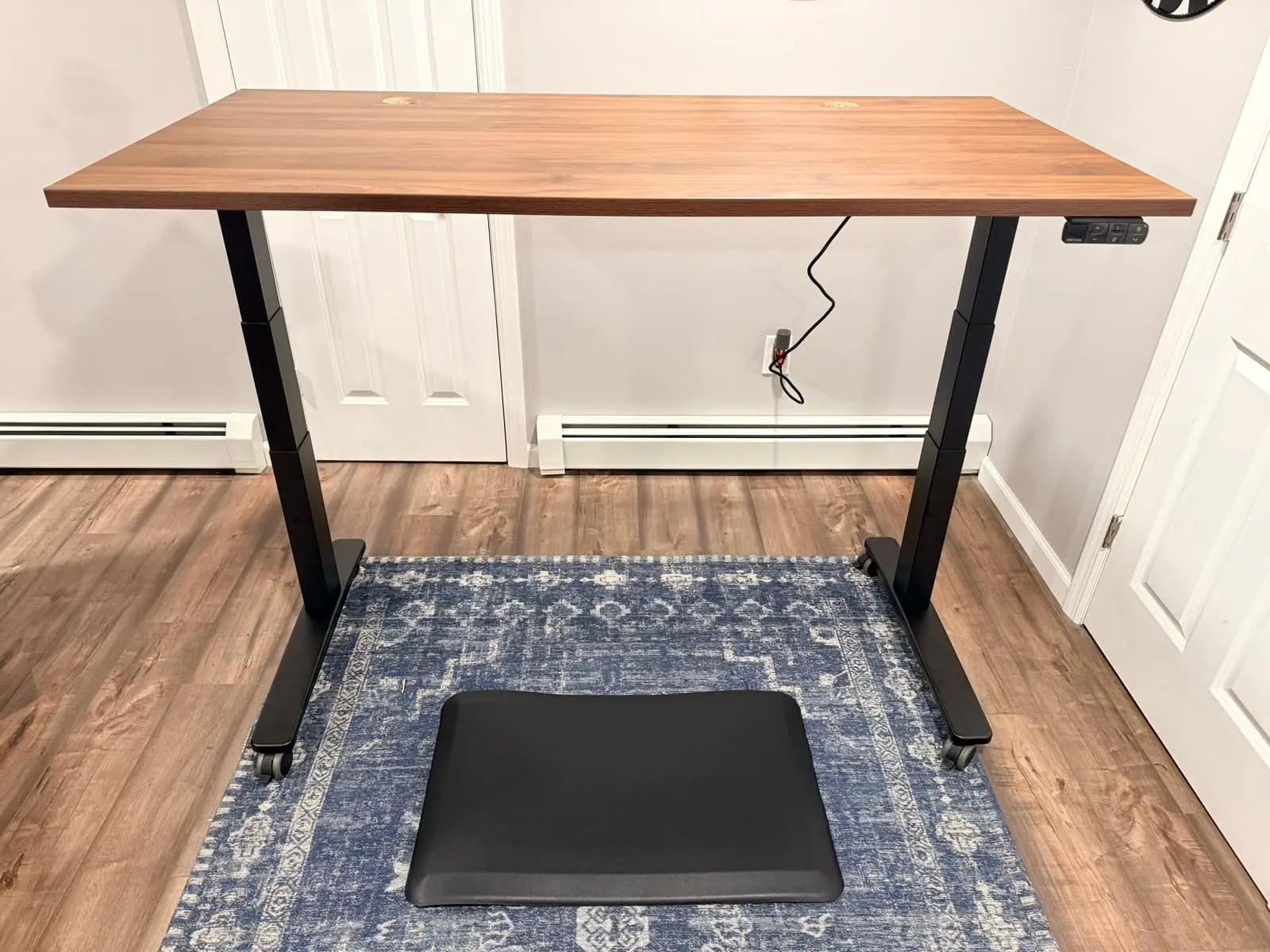
The frame is built around a 3-stage dual precision motor system. Each motor operates independently, providing balanced lifting force across the full height range at 2 inches per second, the fastest in this roundup. The advanced anti-collision sensor uses a six-axis gyroscope that monitors desk motion and automatically reverses when objects or people impede travel, protecting equipment, pets, and children. At 355 lbs of weight capacity, the UPLIFT V3 Standing Desk handles heavy multi-monitor setups, thick hardwood desktops, and full-size desktop PCs without approaching its structural limits. If your equipment outgrows a two-leg frame entirely, the step up is a four-motor desk; our FlexiSpot E7 Plus Max vs UPLIFT V3 4-Leg comparison covers that decision above this guide's budget.
Price Range: $599-$939 depending on desktop size and material. Confirm the configured price; many tops land over $700.
Height Range: 22.6" to 48.7" (26.1" total travel), accommodates approximately 95% of the population
Weight Capacity: 355 lbs
Lift Speed: 2 inches per second (fastest in this roundup)
Motor System: 3-stage dual precision motors, whisper-quiet under 48 dB
Anti-Collision: Six-axis gyroscope sensor
Desktop Options: 50+ materials including solid wood, bamboo, and laminate across multiple sizes
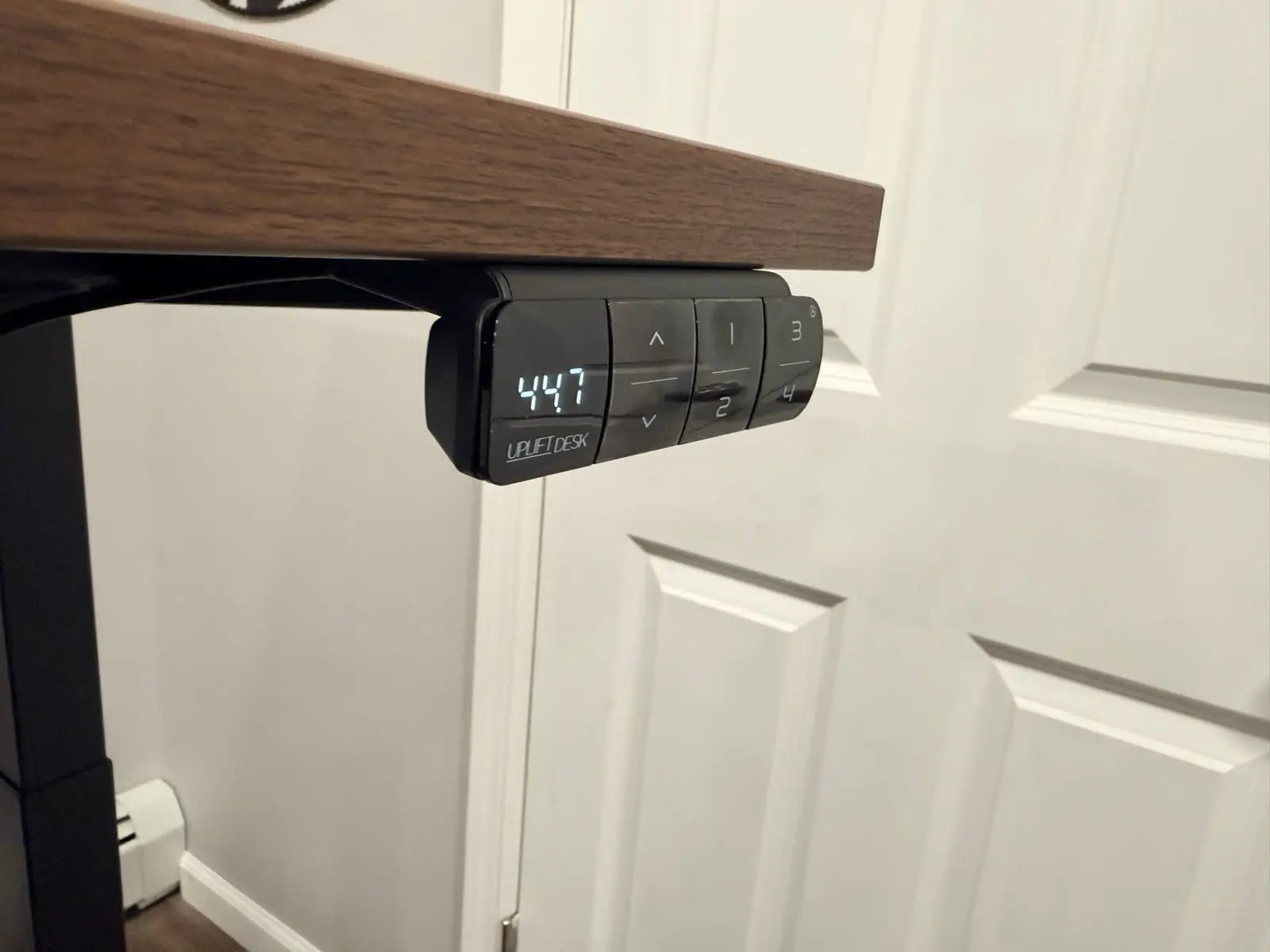
Memory Presets: 4 programmable positions with Advanced Keypad (USB port included)
Assembly: ~5 minutes with a single tool. 50% fewer screws than V2 (16 total). Pre-installed control box, pre-assembled upper frame crossbars
Cable Management: Patent-pending FlexMount Cable Management included free. "Ladder design" PET pouch holds up to 10 lbs of cables and adapters with tool-free depth adjustments. Oval slots in the i-beam for cable routing. Tidy-Ties for custom bundling
Mounting Points: 48 threaded points on the steel frame for UPLIFT Desk accessories (monitor arms, keyboard trays, power strips, storage)
Safety Standard: ANSI/BIFMA X5.5-2021 compliant, meets ANSI/BIFMA G1-2013 height standard
Warranty: UPLIFT Desk advertises 15-year coverage; current written terms apply
The stability at standing height is where the UPLIFT V3 Standing Desk separates itself. The redesigned steel foot with dual-wall construction provides front-to-back firmness that eliminates wobble. Steel plate motor housing covers prevent leg flexing. A contract-grade steel i-beam crossbar, inspired by bridge structural design, offers the stable foundation for a wide variety of desktop sizes. Silicone pads on the leveling guides prevent movement on any surface.
The customization depth is the other differentiator. UPLIFT Desk offers 50+ desktop materials including solid wood, bamboo, butcher block, and various laminates across multiple sizes. This lets you configure the desk to match your space rather than settling for the one or two finishes most brands offer.
UPLIFT Desk currently advertises 15-year coverage for the V3. Warranty length is useful, but it is not a durability test. Read the current terms for covered components, exclusions, and claims before treating the headline duration as equivalent to another manufacturer's policy.
For a head-to-head comparison with the FlexiSpot E7 Pro, see our detailed FlexiSpot E7 Pro vs UPLIFT V3 breakdown. For the IKEA sit/stand path, see IKEA standing desk vs UPLIFT. For the full UPLIFT Desk lineup, see Which UPLIFT Standing Desk Is Right for You?.
FlexiSpot E6 Pro Standing Desk: Best Value
The FlexiSpot E6 Pro hits the price point that most home office buyers are actually shopping in: a complete desk with an included desktop, a capable motor system, and a price that doesn't require justification. At $420-$480, the E6 Pro ships with a 55" x 28" one-piece desktop already included, which is a real cost advantage over competitors that sell the frame separately and charge $100-$200 for a compatible top. When you compare complete desk-to-complete desk pricing, the E6 Pro undercuts the UPLIFT V3 Standing Desk and most of its peers by a wide margin.
The 3-stage dual motor system is the same lift technology found in desks costing $200+ more. Each leg houses its own motor, and the three telescoping segments deliver a 23.6" to 48.8" height range, giving 25.2 inches of total travel. The low end of that range matters more than most buyers realize: at 23.6", the E6 Pro reaches a minimum height that accommodates users as short as 5'0" for proper seated ergonomics, while the 48.8" maximum works for users up to approximately 6'7" standing. The UPLIFT V3 starts at 22.6", which is lower than the E6 Pro, making it the better choice for shorter users or anyone who prefers a lower seated position.
Price Range: $420-$480 with desktop included
Height Range: 23.6" to 48.8" (25.2" total travel)
Weight Capacity: 220 lbs including desktop and all equipment
Motor System: 3-stage dual motor, one per leg, operating independently
Motor Noise: Under 50 dB, quieter than a typical conversation (60 dB)
Desktop: 55" x 28" one-piece desktop included in price
Memory Presets: 4 programmable positions stored on control panel
Anti-Collision Technology: Built-in sensors detect resistance and automatically reverse direction
Leg Design: Oval legs for enhanced stability at standing height
Warranty: 5-year frame and motor warranty, 2-year electronics warranty
The dual motor configuration affects two things most people care about: noise and longevity. Each motor handles roughly half the load, which means neither is straining at capacity during a transition. At under 50 dB, you can adjust height during a video call without your microphone picking up the movement. The anti-collision system detects contact with under-desk drawers, keyboard trays, or PC towers and reverses motor direction before damage occurs.
The oval leg design contributes to stability at full standing height. Round or square legs can develop noticeable wobble above 40", particularly with heavy monitor setups. The oval profile provides a wider stance that resists lateral sway more effectively.
Where the E6 Pro trails the UPLIFT V3 Standing Desk is weight capacity and warranty length. At 220 lbs, you need to be more mindful of your total load. A typical workstation (dual monitors, a monitor arm, a laptop, keyboard, mouse, and desk accessories) totals roughly 50-80 lbs, well within the limit. But if you plan a heavy butcher-block desktop replacement combined with a full-size desktop PC and a triple monitor arm, you'll approach the ceiling. The 5-year warranty is competitive for the price range but can't match the UPLIFT Desk 15-year coverage. For the vast majority of home office setups where total desktop weight stays under 150 lbs, the E6 Pro delivers the core standing desk experience at a price that makes the UPLIFT V3's premium difficult to justify. For users who want the best long-term investment, the UPLIFT V3 Standing Desk with its 15-year warranty is the better choice.
Fezibo Electric Standing Desk: Best Budget
The Fezibo enters this roundup as proof that a functional electric standing desk doesn't require a $400+ commitment. At $169-$250 depending on size and configuration, it's the most accessible entry point into motorized sit-stand work, and it delivers the core features that matter without the build-quality compromises that plague most sub-$200 desks.
The single motor system with 3 memory presets handles the basic job of moving your desk between sitting and standing heights. The transition is slower than the dual-motor desks above. Expect roughly 1 inch per second compared to the 1.4-1.5 inches per second you get from the E6 Pro and 2 inches per second from the UPLIFT V3. It completes the movement reliably. For most users who transition 4-8 times per day, the speed difference adds a few seconds per adjustment and isn't a daily inconvenience.
Price Range: $169-$250 depending on size and features
Motor System: Single motor with 3 memory presets
Available Widths: 48", 55", and 63"
Cable Management: Built-in cable management tray included
Extras: Headphone hook and optional storage shelf
Assembly Time: 30-45 minutes
Height Range: 27.4" to 46.1"
Weight Capacity: 155 lbs (48"), 220 lbs (55"), 275 lbs (63")
Warranty: 5-year frame, 2-year motor and electronics
Frame Construction: Steel frame with T-leg design
What sets the Fezibo apart from other budget desks is the attention to practical details at the price point. The built-in cable management tray is included rather than sold as a $20-$30 add-on, which solves one of the most common complaints about standing desks in general. The headphone hook is a small touch, but it keeps your headset accessible without cluttering the desktop surface. Storage shelf options on certain models add a secondary surface for books, a second monitor, or a printer without requiring a separate piece of furniture.
The Fezibo is available in 48", 55", and 63" widths, which provides more size flexibility than many budget desks that offer a single configuration. The 48" model fits compact home offices and apartment setups. The 63" model provides enough surface area for a dual-monitor configuration with room for a laptop and peripherals.
The trade-offs at this price point are weight capacity and long-term durability. The single motor works harder than a dual-motor system under the same load, which means motor life is more sensitive to overloading. Keep your total desktop weight conservative: a single monitor, laptop, and standard peripherals is the ideal range. The frame stability at maximum height is adequate but noticeably less rigid than the E6 Pro or UPLIFT V3 above. If you type aggressively at standing height, you may notice some lateral sway that the pricier desks eliminate through heavier frames and oval leg profiles. For budget-conscious buyers who want to try standing desk work without a large financial commitment, or for a secondary desk in a guest room or studio, the Fezibo delivers real value.
For a complete budget setup built around the Fezibo, see our Complete Home Office Setup Under $500 guide.
Vari Electric Standing Desk: Best Premium
Vari (formerly VariDesk) is the company that brought standing desks into mainstream office culture with their original desktop converter units in the early 2010s. The Vari Electric Standing Desk represents their evolution into full electric desks, and it brings a level of polish and assembly simplicity that reflects their years of experience with office furniture.
The standout feature is tool-free assembly that takes under 5 minutes. The desk uses a pre-assembled T-leg frame with a steel construction that locks together without bolts, screws, or Allen wrenches. Unbox, attach the legs to the crossbar, set the desktop on top, and plug it in. For buyers who dread the 45-60 minute assembly process of most standing desks, or for office managers setting up multiple workstations, this is a real differentiator. (Note: the UPLIFT V3 Standing Desk also achieves ~5-minute assembly but with a different approach: 16 pre-installed screws and a single tool.)
Price Range: $695-$950 depending on desktop size and finish
Motor System: Dual motor with 4 memory presets and LED display
Height Range: 25" to 50.5"
Frame Design: T-leg steel frame, pre-assembled
Assembly Time: Under 5 minutes, tool-free
Weight Capacity: 200 lbs
Desktop Options: Multiple sizes and finishes available
Noise Level: Quiet operation under 50 dB
Warranty: 5-year warranty
The dual motor system provides smooth, quiet transitions with 4 programmable memory presets. The T-leg design gives the desk a clean, modern profile that works well in professional settings. The LED display shows exact height during adjustment, which is useful for dialing in precise ergonomic positions.
The price is the obvious consideration. At $695, the Vari starts just under the $700 threshold of this guide, and larger desktop sizes push it toward $950. That positions it as a premium option within this roundup rather than a value play. For the same money, you could buy an UPLIFT V3 Standing Desk with the UPLIFT Desk 15-year warranty (vs Vari's 5-year), higher weight capacity (355 vs 200 lbs), 50+ desktop materials, and included FlexMount cable management. What Vari offers in exchange is a refined aesthetic that looks at home in a corporate environment and a brand with deep roots in office ergonomics.
The 200 lb weight capacity is the lowest in this roundup, which limits the desk to standard office configurations. Heavy multi-monitor setups with a large desktop PC will push against this ceiling. For a single monitor, laptop, and standard peripherals, the capacity is adequate but leaves less headroom than the E6 Pro (220 lbs) or UPLIFT V3 (355 lbs). The Vari is the right desk for buyers who prioritize assembly speed, brand reputation, and clean design, and who are willing to pay a premium for those qualities.
Standing Desk Comparison Table
| Feature | UPLIFT V3 | FlexiSpot E6 Pro | Fezibo | Vari Electric |
|---|---|---|---|---|
| Award | Best Overall | Best Value | Best Budget | Best Premium |
| Price | $599-$939 | $420-$480 | $169-$250 | $695-$950 |
| Motor Type | 3-stage dual | 3-stage dual | Single | Dual |
| Lift Speed | 2"/sec | 1.4-1.5"/sec | ~1"/sec | ~1.5"/sec |
| Height Range | 22.6"-48.7" | 23.6"-48.8" | 27.4"-46.1" | 25"-50.5" |
| Weight Capacity | 355 lbs | 220 lbs | 155-275 lbs | 200 lbs |
| Desktop | 50+ materials | 55"x28" included | Included | Included |
| Memory Presets | 4 | 4 | 3 | 4 |
| Anti-Collision | Six-axis gyroscope | Yes | No | No |
| Cable Management | FlexMount (free) | Not included | Tray included | Not included |
| Mounting Points | 48 threaded | Standard | Standard | Standard |
| Assembly | ~5 min (1 tool) | 30-45 min | 30-45 min | Under 5 min |
| Frame Warranty | 15 years | 5 years | 5 years | 5 years |
| Safety Standard | ANSI/BIFMA | N/A | N/A | N/A |
| Best For | Max capacity + warranty | Complete desk at best price | Budget entry | Fast setup + polish |
How to Choose Between These Four Desks
The decision largely comes down to what you prioritize. If you want the desk with the highest weight capacity, the most desktop options, the fastest assembly, the best cable management, and the longest warranty, the UPLIFT V3 Standing Desk is the clear choice. It's the benchmark the rest of the market is measured against. If you want comparable dual-motor performance at roughly half the price with a desktop already included, the FlexiSpot E6 Pro is the better value and the desk we recommend for most buyers who don't have specialized heavy-load requirements.
If your budget is under $250 and you want to experience the benefits of a sit-stand workflow without a large upfront investment, the Fezibo is a capable entry point that avoids the quality pitfalls of the cheapest alternatives. And if brand heritage and a polished aesthetic matter more than maximum specs, the Vari Electric is designed for buyers who value convenience and design refinement, though the UPLIFT V3 now matches its assembly speed.
Buying Tips
- Calculate your actual desktop weight before buying. Add up monitors, arms, laptop, PC tower, and accessories. Stay at least 20-30% below the desk's rated capacity for optimal motor longevity. Most standard home office setups total 50-80 lbs, which all four desks here handle easily.
- Measure your ideal sitting and standing heights before comparing specs. Stand with arms at 90-degree angles and measure from floor to your forearms. That's your target standing height. Do the same while seated. Confirm the desk's range covers both numbers with room to spare.
- Factor in the desktop cost when comparing prices. The FlexiSpot E6 Pro and Fezibo include a desktop at the listed price. The UPLIFT V3 Standing Desk includes one but pricing varies by size and material from UPLIFT Desk's 50+ options. Always compare total cost for a complete, usable desk rather than frame-only prices.
- Use all available memory presets from day one. Program a seated height, a standing height, and at least one intermediate position. The desks with 3-4 presets make transitions frictionless, which is the single biggest factor in whether you actually use the standing feature long-term.
- Plan cable management before loading the desk. The UPLIFT V3 Standing Desk includes FlexMount cable management at no extra cost. For the other desks, route power strips, monitor cables, and charging cables along the frame or through a cable tray before placing heavy equipment on the desktop surface. Reorganizing cables under a fully loaded desk is frustrating.
- Check your floor surface for compatibility. On hardwood, use the included leveling feet to prevent scratching and drift. On thick carpet, confirm the legs sit stable and don't sink unevenly. An anti-fatigue mat ($30-$60) is a worthwhile addition for anyone standing on hard floors more than 20 minutes at a stretch.
Best Standing Desks Under $700 From Major US Retailers
Every pick in this guide is sold by a major US retailer with standard shipping, returns, and warranty support. Here's where each desk actually comes from:
- UPLIFT V3 ($599-$939): sold directly by UPLIFT Desk, the Austin, Texas manufacturer. Buying direct is what unlocks the 50+ desktop materials and the 15-year frame warranty registration.
- FlexiSpot E6 Pro ($420-480): stocked on Amazon with the 55" x 28" desktop included. FlexiSpot also sells its lineup through its own US store.
- Fezibo ($169-$250): stocked on Amazon across all three widths (48", 55", and 63").
- Vari Electric ($695-$950): stocked on Amazon, and Vari sells direct through vari.com for corporate orders.
If you want a single answer: the UPLIFT V3 is the strongest frame in this group, but the listed range is $599-$939 and many configured tops land over $700. The FlexiSpot E6 Pro is the complete-desk pick that stays in budget among the Amazon-stocked options.
If the desktop material matters more than dual-motor performance, the research-backed FlexiSpot EN1 Bamboo review examines the lower-cost single-motor option and its two available surface sizes.
Frequently Asked Questions
What is the best standing desk under $700 for most home office users?
The FlexiSpot E6 Pro ($420-480) is the complete-desk pick that stays under $700: a 3-stage dual motor, 220 lb capacity, and a 55" x 28" desktop included. The UPLIFT V3 Standing Desk is the strongest frame in this group, with 355 lb weight capacity, UPLIFT Desk 15-year frame warranty, 2"/sec lift speed, 5-minute assembly, included FlexMount cable management, and 50+ desktop material options. Configured prices often run $599-$939, so confirm the configured price; many tops land over $700.
How much weight can these standing desks hold?
Weight capacity varies across models. The UPLIFT V3 leads at 355 lbs, followed by the FlexiSpot E6 Pro at 220 lbs, and the Vari Electric at 200 lbs. A typical home office setup with dual monitors, a laptop, and standard peripherals weighs 50-80 lbs, which all four desks handle comfortably. The capacity difference matters most for heavy setups with thick hardwood desktops, full-size desktop PCs, and triple monitor arms.
Is a dual motor standing desk worth the extra cost over a single motor?
For most buyers, yes. Dual motor desks lift faster (the UPLIFT V3 achieves 2"/sec, the E6 Pro does 1.4-1.5"/sec vs roughly 1"/sec for the Fezibo), support higher weight capacities, and distribute mechanical stress across two motors instead of one. This results in quieter operation, longer motor lifespan, and better stability during transitions. The Fezibo proves a single motor can work at the budget level, but if your budget allows $400+, the dual-motor desks provide a noticeably better daily experience.
Do I need an anti-fatigue mat with a standing desk?
An anti-fatigue mat is not strictly required but is recommended for standing sessions longer than 20 minutes, especially on hard floors. A quality mat ($30-$60) reduces foot, leg, and lower back fatigue by cushioning the contact surface and encouraging subtle weight shifting. If you wear supportive shoes while standing, the need is reduced. Barefoot or sock users will notice a substantial comfort difference. The UPLIFT Desk Standing Desk Mat is a popular pairing with the UPLIFT V3.
How loud are electric standing desks during adjustment?
The dual-motor desks in this roundup all operate at or under 50 dB, which is quieter than a normal conversation at 60 dB and comparable to a refrigerator hum. The UPLIFT V3 Standing Desk is the quietest at under 48 dB. You can adjust height during a video call without your microphone picking up the movement. Single-motor desks like the Fezibo are slightly louder due to the motor working harder under the same load, but still not disruptive in a home office environment.
How does the UPLIFT V3 compare to the FlexiSpot E6 Pro?
The UPLIFT V3 Standing Desk offers 355 lbs of weight capacity vs. the E6 Pro's 220 lbs, the UPLIFT Desk 15-year frame warranty vs. 5 years, 50+ desktop materials vs. one included size, faster 2"/sec lift speed vs. 1.4-1.5"/sec, 5-minute assembly vs. 30-45 minutes, and included FlexMount cable management. The E6 Pro counters with a lower complete-desk price ($420-$480 vs. $599-$939 with a comparable desktop). For a deeper comparison including the E7 Pro, see our FlexiSpot E7 Pro vs UPLIFT V3 breakdown.
Can I use a standing desk with a treadmill or walking pad?
Yes, but with considerations. Keep the desk at a height that allows your arms to rest at 90 degrees while walking. The slower you walk (1-2 mph), the easier it is to type and use a mouse. The UPLIFT V3 Standing Desk's 355 lb capacity provides the most headroom. UPLIFT Desk also offers a dedicated Walking Desk bundle with an integrated inclining walking pad (0-15% incline). The UPLIFT Inclining Walking Pad is a common pairing with the V3. See our Which UPLIFT Standing Desk guide for details.
How long does it take to assemble these standing desks?
Assembly time varies. The UPLIFT V3 Standing Desk leads with approximately 5 minutes using a single tool. UPLIFT Desk reduced the hardware count by 50% (from 32 to 16 screws) with pre-installed fasteners and a pre-installed control box. The Vari Electric also achieves under 5 minutes with tool-free assembly. The FlexiSpot E6 Pro and Fezibo take 30-45 minutes with included hardware. Having a second person helps with all models for flipping the assembled frame upright and positioning heavy desktops.
See our UPLIFT V3 unboxing and first impressions for an assembly walkthrough and photos. All recommendations are based on specification analysis, expert reviews, and owner feedback.
Related Guides
- UPLIFT V3 Standing Desk Review: Weeks of nightly use on the default pick
- UPLIFT V3 Standing Desk Unboxing: Assembly walkthrough, real photos, and first impressions
- IKEA Standing Desk vs UPLIFT: Store-pickup sit/stand vs the V3
- FlexiSpot E7 Pro vs UPLIFT V3: Head-to-head comparison
- Which UPLIFT Standing Desk Is Right for You?: Full UPLIFT Desk lineup comparison
- Best Ergonomic Chairs Under $400: Pair your standing desk with a chair that supports posture
- Best Monitor Arms for Desk Space: Free up desktop real estate and position your screen
- Best Desk Mats for Home Office: Protect your desktop surface
- Best Desk Lamps for Home Office: Complete your lighting setup
- Desk Cable Management: Complete Setup Guide: Organize your standing desk cables
- Complete Home Office Setup Under $1,000: UPLIFT Desk premium build included
- Complete Home Office Setup Under $500: Budget build with the Fezibo