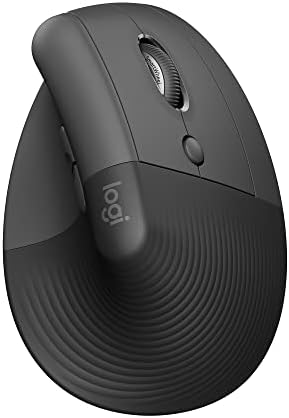
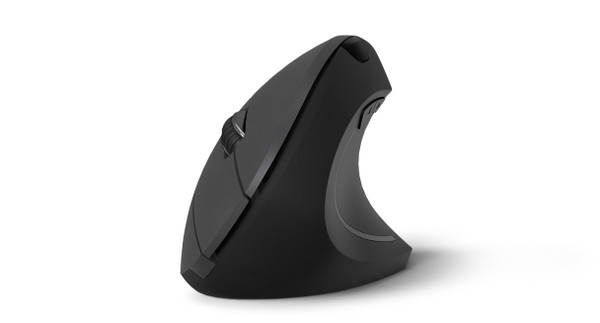
A vertical mouse rotates your hand into a handshake position so your forearm stops pronating, the wrist position that builds strain over thousands of clicks per day. Logitech sells two vertical mice that solve the same ergonomic problem in slightly different ways. The Logitech Lift is the smaller, more accessible pick. The Logitech MX Vertical is the premium full-size option. They share the same 57-degree tilt angle and the same multi-device workflow. The differences come down to hand size, sensor capability, battery preference, and price. This guide breaks down which one fits your setup.

Best for most people: The Logitech Lift ($50-$70) covers small to medium hands, runs on a single AA battery for 24 months, and ships in a dedicated left-handed version. The smarter buy for most readers.

Best for large hands or premium build: The Logitech MX Vertical ($75-95) fits hands 7 inches or larger, adds a 4,000 DPI Darkfield sensor that tracks on glass, and charges over USB-C. Worth the upcharge if your hand size demands it.

Best UPLIFT alternative: The UPLIFT Wave Vertical Ergonomic Mouse offers vertical ergonomics at roughly half the Lift's price, with both right and left-handed versions. A solid budget pick if you're already in the UPLIFT ecosystem.

Which Vertical Mouse for Your Situation

Your SituationBest PickPriceWhy
Small to medium hands (under ~7")Logitech Lift$50-$70Body sized for most hands
Large hands (~7" or bigger)Logitech MX Vertical$75-95Full-size body, cramped hands strain on the Lift
Left-handedLogitech Lift$50-$70Dedicated left-handed SKU
Work on a glass deskLogitech MX Vertical$75-95Darkfield sensor tracks on glass
Hate rechargingLogitech Lift$50-$7024 months on one AA
Tight budgetUPLIFT Wave$34+Vertical ergonomics at ~half the price

Quick Comparison

FeatureLogitech LiftLogitech MX Vertical
Price$50-$70$75-95
Tilt angle57°57°
Recommended hand sizeSmall to medium (under ~7")Medium to large (~7"+)
Sensor4,000 DPI optical4,000 DPI Darkfield laser
Tracks on glassNoYes
Battery1× AA, ~24 monthsUSB-C rechargeable, ~4 months
Left-handed modelYes (dedicated SKU)No
Quiet clicksYes (SilentTouch)No
Multi-device3 devices (Bluetooth + Logi Bolt)3 devices (Bluetooth + Logi Bolt)
Programmable buttons44
Color optionsGraphite, Off-White, RoseGraphite
SoftwareLogi Options+Logi Options+

Why Vertical Mice Matter

Standard mice force the forearm into pronation, the position you'd be in if you turned a doorknob clockwise and held it. Hold that for hours a day across years of computer work and the strain compounds. A vertical mouse rotates the hand toward a handshake position, where the muscles of the forearm sit more naturally. Logitech's research cites a 4× reduction in muscular activity in the forearm and a 10° reduction in wrist pronation versus a conventional mouse. Both the Lift and MX Vertical use the same 57-degree angle, which Logitech landed on as the right balance between ergonomic relief and practical usability. Steeper angles feel more relaxing initially but make precise clicks harder; shallower angles barely improve the wrist posture.

The choice between them isn't about which is more ergonomic. It's about which one fits your hand and your workflow.

Logitech Lift Vertical: Best for Most People

The Lift launched in 2022 as Logitech's response to one weakness of the older MX Vertical: it didn't fit smaller hands. The Lift's body is roughly 30% smaller, lighter, and shaped for hand sizes under 7 inches (Logitech's published threshold). It also addresses two more practical gaps from the MX Vertical playbook: it ships in a dedicated left-handed version, and it uses an AA battery instead of USB-C charging. Either of those alone makes it the right pick for a large slice of buyers.

Sensor: 4,000 DPI optical sensor. Tracks reliably on cloth, wood, plastic, and most desk mats. It does not track on glass. If your desk surface is glass or highly reflective, the MX Vertical's Darkfield laser is the right pick.

Battery: A single AA battery powers the Lift for up to 24 months, depending on use. There's no charging cable, no charging anxiety, and replacement is instant. This is the unsung feature that makes the Lift quietly easier to live with than the MX Vertical for anyone who hates plugging things in.

Quiet clicks: SilentTouch buttons reduce click noise by what Logitech rates as 90% versus a standard mouse. This matters in shared offices, coffee shops, and on Zoom calls where the microphone picks up everything.

Multi-device: Connects to up to 3 devices via Bluetooth Low Energy or the included Logi Bolt USB receiver. Easy-Switch button on the bottom cycles between paired devices in 1 to 2 seconds.

Customization: Logi Options+ supports per-application profiles, gesture shortcuts, and Smart Actions for multi-step automations. Identical software experience to the MX Master and MX Vertical lines.

Color options: Graphite, Off-White, and Rose. The off-white in particular has been popular with users matching it to a lighter desk setup.

Price: $50-$70

Buying Tips

  • The Lift frequently drops to the $50-$60 range during Prime Day and Black Friday. The current price is already below the $79.99 MSRP.
  • If you're left-handed, search for the Lift specifically and verify the model number ends in -LH or the listing explicitly says "for left hand". Logitech sells them as separate SKUs.
  • Both right and left-handed Lifts come in all three colors. Stock varies by color.
  • The Lift is not designed for gaming. It works for casual gaming but the 4,000 DPI sensor and ergonomic shape aren't optimized for fast tracking.

Logitech MX Vertical: Best for Large Hands and Premium Build

The MX Vertical is the older of the two (it launched in 2018) but it remains the right pick for two specific user profiles: people with hands of about 7 inches or larger, and people who want a Darkfield sensor that tracks on virtually any surface including glass. It's also currently on a deep discount, which closes the price gap with the Lift considerably.

Sensor: 4,000 DPI Darkfield laser sensor. Tracks on glass at least 4mm thick, on lacquered wood, on marble, on virtually any surface. This is the same sensor technology as the MX Master line, and it's a real practical advantage if your desk has a glass top, a lacquered finish, or a glossy desk mat.

Battery: USB-C rechargeable, with a full charge lasting up to 4 months. Fast charging through USB-C: a 1-minute charge provides roughly 3 hours of operation. The tradeoff against the Lift is that you eventually have to remember to charge it. There's no AA fallback.

Build: The MX Vertical uses softer-touch surfacing and feels more substantial in the hand. Logitech rates it for medium-to-large hands. Multiple reviewers and Logitech's own size-guidance materials place the cutoff at around 7 inches measured from base of the palm to the tip of the middle finger. If your hand is at the upper end of average or larger, the MX Vertical will feel correct where the Lift might feel cramped.

Multi-device: Same Easy-Switch system as the Lift. 3 paired devices, switch in 1 to 2 seconds, supports Bluetooth or the Logi Bolt USB receiver.

Customization: Logi Options+ with per-application profiles, identical software to the Lift and MX Master lines.

Click feel: The MX Vertical does not use SilentTouch. The clicks are tactile and slightly louder than the Lift, though still quieter than a standard mouse. If silent clicks matter to you, the Lift wins this category.

Price: $75-95

Buying Tips

  • The MX Vertical's MSRP is $99.99 but it has been holding consistently in the $75-$95 range through most of 2026 due to the Lift cannibalizing its mainstream demand.
  • There is no left-handed version. If you're left-handed, the Lift is your only Logitech vertical option.
  • The Darkfield sensor tracks on glass but be aware that very thin glass (under 4mm) or glass with adhesive films can still cause issues.
  • Older MX Vertical units from 2018 to 2021 use the older Logi Options software (not Options+). Newer firmware updates added Options+ support across the line.

How to Decide

The decision tree is short:

  • Your hand is under 7 inches → Logitech Lift. The MX Vertical will feel oversized.
  • You're left-handed → Logitech Lift (left-handed SKU). The MX Vertical isn't available for lefties.
  • Your desk is glass or you use a glossy mat → Logitech MX Vertical. The Darkfield sensor is a practical advantage.
  • You want to forget about charging cables → Logitech Lift. AA batteries last roughly 6× longer between swaps than USB-C charges last between top-ups.
  • You take a lot of video calls in shared spaces → Logitech Lift. SilentTouch matters more than the spec sheet suggests.
  • None of the above and you're between hand sizes → Either works. The Lift saves money and the MX Vertical feels more substantial. Both are at competitive prices.

A Note on UPLIFT's Vertical Mouse

The UPLIFT Wave Vertical Ergonomic Mouse is worth mentioning if you're already buying from UPLIFT Desk. At roughly half the Lift's price, it offers vertical ergonomics with both right and left-handed versions. It doesn't have the Logi Options+ software ecosystem, the multi-device pairing, or the Darkfield sensor. But for a sub-$40 vertical mouse that solves the basic wrist-rotation problem, it's a credible budget alternative. We'd still recommend the Lift for most readers given its software, battery life, and quiet clicks, but the Wave is the right pick if budget is the deciding factor.

Frequently Asked Questions

Are vertical mice actually more ergonomic?

Yes, with caveats. The pronation reduction is real and measurable, and most users with existing wrist or forearm strain report relief within days of switching. The caveats: the transition takes 1 to 2 weeks of feeling slower, vertical mice are not optimal for fine pixel-level work like detailed photo retouching or precision gaming, and they don't fix poor desk ergonomics on their own. Pair a vertical mouse with a properly-set desk height and a supportive chair for the full benefit.

Can I use these on a Mac?

Both work with Mac out of the box. Logi Options+ supports macOS 13 and later, including Apple Silicon. Both mice pair via Bluetooth or the included Logi Bolt USB-A receiver. Macs with USB-C only ports require a USB-A adapter for the Bolt receiver (or you can use Bluetooth and skip the receiver entirely).

How long does the Lift's AA battery actually last?

Logitech rates the Lift at 24 months on a single AA. Real-world numbers from review aggregations land closer to 18 to 22 months for typical 8-hour workday use. Heavy use cuts that to 12 to 14 months. Either way, an AA battery costs roughly $1, making the practical battery cost negligible compared to the convenience of never charging.

Is the MX Vertical worth the price difference over the Lift?

For users with large hands, yes. The shape fits differently and forcing a too-small mouse defeats the ergonomic purpose. For users with average or smaller hands, the Lift is the smarter buy. The Darkfield sensor and USB-C charging are nice but not deciding factors for most home office setups.

Will either of these work for gaming?

Neither is built for gaming. The 4,000 DPI sensor on both is enough for casual gaming, and the multi-button programmability supports MMO-style hotbars, but the vertical orientation makes fast precise tracking awkward. If your primary use is gaming, look at gaming-specific ergonomic mice. If you mix productivity work with occasional gaming, the Lift or MX Vertical works fine for the gaming portion.

Do I need Logi Options+ to use these mice?

No. Both function as standard mice out of the box once paired. Logi Options+ unlocks per-application profiles, gesture shortcuts, button remapping, and Easy-Switch configuration. If you only need basic mouse functionality, you can skip the software entirely. Power users will want it.

What's the difference between Logi Bolt and the older Logitech Unifying receiver?

Logi Bolt is Logitech's newer wireless protocol with stronger encryption (Bluetooth Security Mode 1 Level 4, FIPS-compliant) and better resistance to interference in dense wireless environments. Both the Lift and MX Vertical ship with Logi Bolt receivers. They are not compatible with the older Unifying receivers from the pre-2022 Logitech lineup.