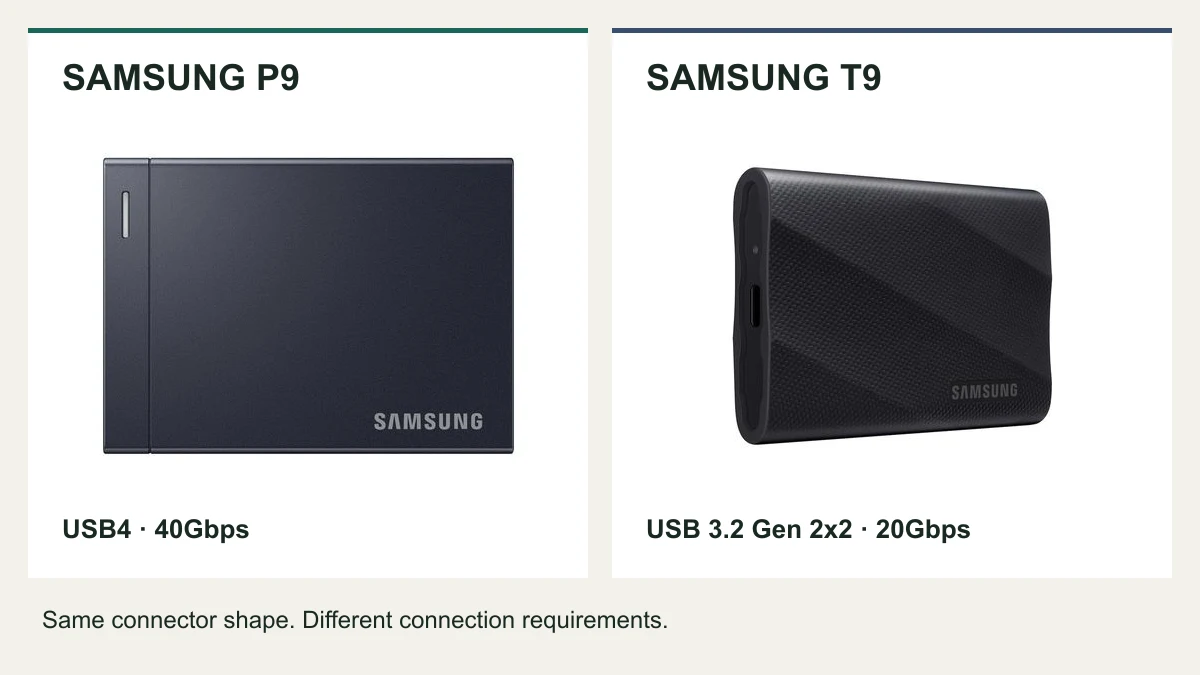
The Samsung P9 is the more interesting upgrade for a USB4 workstation. The T9 still makes sense when your computer explicitly supports USB 3.2 Gen 2x2 and its price leaves room for more storage or a second backup. If both will sit behind a 10Gbps dock port, start by fixing that connection before buying a faster drive.
Quick answer
Large file transfers over USB4: Consider the P9, provided your exact computer, cable, and connection support its interface.
A PC with explicit 20Gbps Gen 2x2 support: Compare the T9's current price at your required capacity before paying for the P9.
A 10Gbps hub or an adequate existing T9: Keep the drive for now. A higher advertised maximum doesn't remove a slower connection.
Availability checked September 18, 2026: Samsung's US P9 page showed all four capacity options as out of stock. That describes Samsung's own store, not every retailer. Check current P9 availability at Samsung before planning a time-sensitive build.
Samsung P9 vs T9: the specifications that matter
| Buying detail | Samsung P9 | Samsung T9 |
|---|---|---|
| Interface | USB4, up to 40Gbps | USB 3.2 Gen 2x2, up to 20Gbps |
| Advertised sequential read maximum | Up to 4,000MB/s | Up to 2,000MB/s |
| Advertised sequential write maximum, 4TB | Up to 3,800MB/s | Up to 2,000MB/s |
| Capacity range | 1TB, 2TB, 4TB, 8TB; regional availability varies | 1TB, 2TB, 4TB |
| Limited warranty | 5 years | 5 years |
| Manufacturer drop-resistance claim | Up to 2 meters | Up to 3 meters |
The speed and capacity comparison comes from Samsung's P9 launch announcement. Warranty and drop claims appear on the P9 product page and T9 specifications. Drop resistance describes controlled tests, not a promise that a dropped drive or its data will survive.
These are manufacturer maximums, not our measurements. Capacity matters, too: Samsung lists the 2TB T9's write maximum as 1,950MB/s. Don't apply the 4TB figures to every variant or expect a folder of small files to copy at a sequential benchmark rate.
Check the port before choosing the drive
USB-C describes the connector. For this purchase, you also need the data protocol and speed supported by the exact socket you'll use.
| What your computer or dock explicitly lists | How to approach the purchase |
|---|---|
| USB4 at 40Gbps | Investigate the P9 for frequent large transfers. Verify the complete connection and shipping availability. |
| USB 3.2 Gen 2x2 at 20Gbps | The T9 is a relevant comparison. Price the capacity you need, then decide whether a future USB4 upgrade justifies the P9. |
| USB 3.2 Gen 2 at 10Gbps | Neither drive can deliver its headline maximum through that port. Prioritize capacity and total cost. |
| USB-C, with no data specification | Find the computer or dock's technical sheet before buying. Connector shape alone isn't enough. |
The T9's full interface performance requires Gen 2x2 support, according to Samsung's compatibility notes. A USB4 or Thunderbolt badge doesn't, by itself, confirm that separate USB 3.2 mode. Look for explicit support instead of assuming every newer port runs every older drive at its maximum.
A Mac mini example: front and rear are different
On the 2024 Mac mini with M4, Apple lists the front USB-C ports at up to 10Gbps. The rear Thunderbolt 4 ports support USB4 at up to 40Gbps. The connectors look familiar, but they offer different paths for a P9. Use the rear USB4-capable connection when evaluating it, rather than the convenient front socket. These limits are specific to that model; check your own Mac's specifications. Apple Mac mini technical specifications.
For a laptop desk, reserve a suitable direct computer connection for storage if your dock's peripheral ports are slower. Our MacBook Air M5 dual-monitor setup guide helps map the display side of that decision.
Your dock can be the bottleneck
A dock's host connection and its peripheral sockets are different specifications. A fast link between the dock and laptop doesn't turn a downstream 10Gbps USB port into a 40Gbps SSD connection.
Before replacing a drive, write down this chain:
Computer port → dock or hub, if used → SSD port → cable → drive.
Check each part against the mode you want. Start with a direct connection and the drive's supplied cable when troubleshooting. Add the dock only after the basic setup works. Other devices sharing the dock can also affect the workload; this comparison doesn't predict performance with every display, network adapter, and drive connected at once.
If a single-cable desk matters more than maximum transfer speed, accepting the slower connection may be the right decision. Just price the SSD for that actual setup. See our Thunderbolt dock vs DisplayLink dock comparison for the display and peripheral tradeoffs.
When I'd choose the P9
I'd shortlist the P9 for a workstation with confirmed USB4 support where moving large project folders is a recurring part of the day. I'd also investigate it when I need an 8TB portable option: Samsung announced that capacity for the P9, while the T9 range tops out at 4TB. Samsung's lineup announcement.
The catch is that a higher sequential maximum doesn't tell us how either drive will behave throughout your longest transfer. We haven't measured sustained writes, temperature, or performance as these drives fill. If uninterrupted large writes are your main job, those unanswered questions matter more than an attractive peak number.
My buying condition: a confirmed compatible connection, enough capacity for the working project, and a delivery date that fits the job. If the project starts tomorrow, a notify-me button isn't a storage plan.
Check the P9's current availability and exact capacity.
When I'd choose or keep the T9
I'd keep a T9 that already holds the working files and finishes transfers without interrupting the day. Replacing it solely because the P9 has a larger headline speed is hard to justify before checking the port and identifying an actual delay.
For a new purchase, a confirmed Gen 2x2 PC connection makes the T9 worth pricing. Compare equal capacities, the seller, warranty eligibility, and delivery date. If a lower T9 price lets you buy the capacity you actually need, that can matter more than a higher speed ceiling.
For documents, occasional photo exports, or a scheduled backup, I'd put a dependable second copy ahead of replacing an adequate working drive. Neither model makes files safe simply by being newer or faster.
Read Samsung's T9 specifications and compatibility requirements. This is a technical reference, not a US stock listing.
Set up the drive without rebuilding your desk
- Choose its job. Decide whether this is the active project drive, a transfer drive, or a backup destination. Keep a separate copy of irreplaceable files.
- Confirm the exact port. Use your computer's model-specific documentation and the dock's downstream port specification.
- Connect directly first. Use the supplied cable to establish a simple starting configuration before adding adapters or a hub.
- Try a copy of a real project. Check that the destination files open. Evaluate whether the transfer delay actually affects your work before changing hardware again.
- Plan the physical placement. Keep the drive within reach, avoid strain on its connector, and leave cable slack for laptop movement or desk height changes.
If you're considering reformatting an existing drive for a different operating system, back up and verify its files first. Formatting erases the volume. You don't need to reformat a working drive just to follow this comparison.
Frequently Asked Questions
Is the Samsung P9 twice as fast as the T9?
Samsung advertises a 4,000MB/s sequential read maximum for the P9 versus 2,000MB/s for the T9. That comparison of rated maximums doesn't establish that your file transfers will finish in half the time. Connection mode, workload, and the other drive in the transfer all matter.
Will the P9 help if my dock only has 10Gbps USB ports?
That dock port prevents you from reaching the P9's advertised maximum through it. Check whether a direct USB4 connection or an appropriate downstream USB4 port is available before buying for speed.
Is the T9 a good choice for a Mac?
Check the exact Mac's interface support and your workload. A compatible connection doesn't guarantee the T9's full Gen 2x2 speed. For a new speed-focused purchase on a USB4 Mac, the P9 is worth investigating; an existing T9 that meets your needs doesn't automatically need replacing.
Can I buy the P9 in the US now?
At our September 18, 2026 check, Samsung's US store showed the P9 capacity options as out of stock. Other retailers may differ. Confirm the exact capacity, seller, and delivery date before ordering.
Related workstation guides
- Plan a MacBook Air M5 desk with two monitors
- Compare Thunderbolt and DisplayLink docking options
- Set up dual monitors step by step
Product photographs: Samsung. The comparison uses manufacturer specifications and computer documentation, with no hands-on SSD benchmark claims.