
Disclosure: UPLIFT provided both desks for review. I use both daily in different rooms. Affiliate links below.
I own both. The UPLIFT V3 lives in the home office. The Parsons lives elsewhere. Same brand, same 15-year frame story, same 355 lb rating class. Different jobs and usable height ranges.
Short fork:
- Daily computer workstation → V3 · price varies. Faster, quieter, six-axis anti-collision, FlexMount, 48 threaded mounts, Bluetooth app, ~5-minute single-tool assembly.
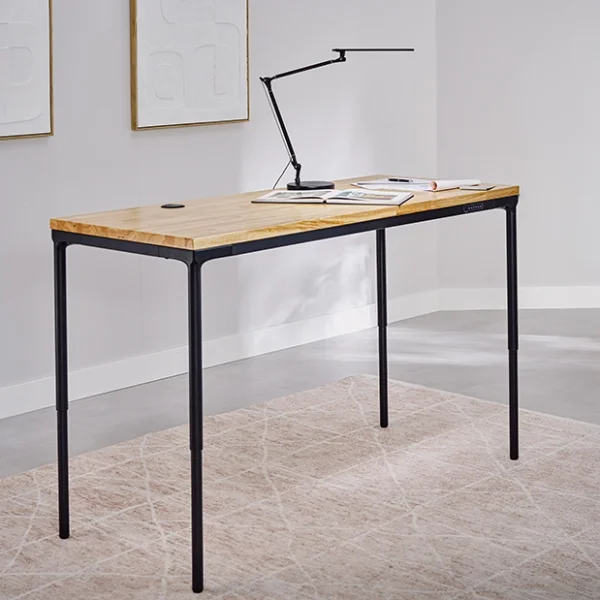
- Desk that should read as furniture → Parsons · $829+. Tapered legs hide the lift; flush apron keypad; writing/drawing/shared-room vibes.
Neither is "better." One is the better workstation. One is the better piece of furniture. Read my V3 daily-use review and Parsons furniture-desk review for the hands-on details.
Specs that matter
| UPLIFT V3 | UPLIFT Parsons | |
|---|---|---|
| Price | price varies | $829+ |
| Look | Industrial steel / i-beam / dual-wall feet | Tapered legs hiding the lift |
| Motors / legs | Two motors / two legs | Four motors / four legs |
| Height with a 1-inch desktop | 22.6 to 48.7 in | 27.7 to 45.1 in |
| Capacity | 355 lb | 355 lb |
| Listed speed | 2 in/s (full range ~13.45 s in my notes) | 1.3 in/s; noticeably slower in my use |
| Presets | 4 | 3 |
| Keypad | Bottom-mounted advanced + USB | Flush in front apron |
| Anti-collision | Six-axis gyroscope | Resistance-based (ASF reset calibrate) |
| Noise | Under 48 dB listed; whisper-quiet here | Audible on speakerphone in my use |
| Cables | FlexMount included | Rear channel + leg-clip channel |
| Frame mounts | 48 points for compatible accessories | No equivalent frame mounting system; verify desktop mount fit |
| Bluetooth app | Yes | No |
| Assembly | ~5 min, 16 screws, 1 tool | Drill, more screws/cables |
| Warranty | 15-year frame | 15-year frame |
Manufacturer specifications: UPLIFT V3 and UPLIFT Parsons. The Parsons frame specification sheet lists frame-only heights; the table adds a 1-inch top to compare finished desk heights. Thicker tops and selected height-changing accessories alter the result. Published capacity isn't a load I tested.
Design: the real fork
V3 looks like office equipment. Dual-wall feet, i-beam, logo on the crossbar. Correct in a dedicated office. Awkward if you drop it in a living room that already has a sofa personality.
Parsons does not announce “standing desk.” Thin tapered legs, wood top, flush keypad. Visitors ask if it even raises. That is the point: writing desk, craft table, shared collaboration surface that happens to sit-stand.
Stability
Both hold standing height with monitors and front-edge lean in my daily use. V3 shows its strength. Parsons hides it; thin legs look delicate until nothing moves at max height. A lifting rating isn't a measurement of wobble. My impressions here describe the setups I use, not a maximum-load test.
Motors, noise, anti-collision
V3 uses two motors, while Parsons has a synchronized motor in each of its four legs. The listed travel speeds are 2 in/s and 1.3 in/s respectively. V3 is the snappier sit-stand; I don't plan around the move. Parsons is slower enough to notice. V3 stays whisper-quiet; Parsons can show up on speakerphone. V3’s six-axis gyro and Parsons’ resistance-based system both stop on unexpected load, but feel different in use.
Bluetooth on V3 is a party trick and a real tool: raise the desk from across the room while someone is seated. Parsons skips the app.
Cables and mounts
V3's FlexMount handles cable storage. Its 48 frame points support compatible accessories, rather than serving as a universal mount for monitor arms. Check the mounting method for the exact arm you choose.
Parsons uses built-in cable channels and has fewer frame accessory options. For a desktop clamp or grommet mount, check the top thickness, apron clearance and the arm manufacturer's requirements before ordering. A clamp that fits the V3 doesn't automatically fit the Parsons.
Price
Configured V3 often starts lower and climbs with tops/options. Parsons starts higher as the furniture path. Compare live carts: price varies · $829+. Warranty length matches; you are paying for job and look, not “more years on paper.”
Which way
- V3 · price varies: all-day screens, cable pouch, speed, quiet and compatible frame accessories.
- Parsons · $829+: room-friendly furniture that still sit-stands, provided its height range fits you.
- Need a corner or a higher-capacity four-leg rectangle instead? Read my V3 L-Shaped desk review or V3 4-Leg desk review.
Frequently asked questions
Which is more stable?
Both feel solid at standing height in my use. Pick by look and accessory story, not a wobble contest.
Shorter seated height?
With a 1-inch desktop, V3 starts at 22.6 inches and Parsons at 27.7 inches. Measure your seated elbow height and check the top thickness and base accessories in your exact order.
Same warranty?
Yes, both advertise 15-year coverage. Read the current written terms for the configuration you're ordering.
Can Parsons take monitor arms?
A compatible desktop clamp or grommet mount may work, but check the Parsons apron clearance, desktop thickness and the arm's installation requirements. Neither desk's frame mounting points make every monitor arm compatible.
UPLIFT links are affiliate links.