


Some home office guides recommend premium products in every category before accounting for the final total. That isn't useful if you have a firm budget.
If you want the desk we use hands-on, Configure the UPLIFT V3 $599-$939. The six-piece budget build below uses a complete FlexiSpot desk to stay near the $1,000 target.
This guide assembles a six-piece home office setup around a target budget using manufacturer specifications and live price tokens where product records support them. The C300 and other non-UPLIFT picks are research-backed, not WorkstationSetup hands-on tests. If your budget stretches further, the UPLIFT Desk premium build draws on documented hands-on use of the UPLIFT products shown.
The Budget Build: check the live total
Desk: FlexiSpot E6 Pro ($420-480), with the exact desktop, keypad, capacity, and warranty confirmed on the linked configuration
Chair: Sihoo Doro C300 ($279.99−50%) with self-adaptive lumbar, 4D coordinated armrests, an adjustable headrest, and full mesh
Monitor Arm: North Bayou F80 (unavailable) gas spring arm for sit-stand transitions
Desk Mat: K KNODEL ($15-25) waterproof PU leather with non-slip backing
Keyboard: Logitech Wave Keys ($50-$60) wave-shaped layout with integrated palm rest
Mouse: Logitech Signature M650 ($39.99) with SmartWheel scroll and silent clicks
The final total moves with live prices. Check each product token before buying rather than relying on an old fixed bundle estimate.
The Strategy: Why These Six Products
Building a home office on a budget requires making clear allocation decisions. Prioritize the desk and chair when their dimensions solve a real fit problem, then add the monitor arm and input devices that address your screen and hand position. There is no universal percentage split that maximizes ergonomic value for every person.
Each product fills one defined role in the setup. Availability, seller, and return policies vary, so use the current affiliate destination and retailer terms shown when you buy.
Which Pieces to Prioritize
Most people don't buy all six at once. Here's how to adapt the build to your situation:
| Your Situation | Buy First | Why |
|---|---|---|
| Tightest budget, can't do all 6 | Chair + desk | The two foundation pieces; everything else is improvable later |
| Already have a desk | Skip the FlexiSpot, upgrade the chair | Redirect that part of the live budget toward a better-fitting chair |
| Already have a keyboard and mouse you like | Skip the Logitech pair | Leaves more of the live budget for a monitor arm or chair |
| Building over time | Desk → chair → monitor arm → keyboard → mouse → mat | Foundation-first: the desk and chair carry the ergonomic load |
| Budget stretches past $1,000 | See the UPLIFT premium build below | Longer stated coverage and documented hands-on UPLIFT evidence |
Standing Desk: FlexiSpot E6 Pro
The desk is one of the largest expenses in this build. The FlexiSpot E6 Pro is included as a research-backed electric standing desk sold in configurations that include a desktop. FlexiSpot has used E6 and E6 Pro naming across multiple configurations, including retailer-specific variants, so an older specification block should not be treated as universal.
Price: $420-480
Desktop and color: Confirm the exact linked configuration
Lift system: Confirm the current E6 Pro configuration at the retailer
Height range and weight capacity: Confirm on the current linked listing before buying
Keypad, presets, and anti-collision: Features vary by configuration
Warranty: Confirm the terms for the exact model, seller, country, and purchase channel
This guide has not assembled or stability-tested this FlexiSpot configuration. Its inclusion is based on its published sit-stand feature set and position in the target budget, not a claim about long-term motor life, noise, or wobble.
Measure your seated and standing elbow heights, then compare them with the current listing's range. Also add the desktop, monitor, arm, computer, and accessories when checking the published load limit.
The budget desk here is the FlexiSpot E6 Pro. The premium path is the UPLIFT V3. For load, height, warranty, and why the V3 is not sold as an under-$700 default, see FlexiSpot E6 Pro vs UPLIFT V3.
If the other FlexiSpot is the current E7 Pro instead of the V3, see FlexiSpot E6 Pro vs E7 Pro. That 1v1 is FlexiSpot vs FlexiSpot. Both desks stay research-backed.
If you want the two-motor E7 Pro against the four-motor E7 Plus Max instead of E6 Pro vs E7 Pro, see FlexiSpot E7 Pro vs E7 Plus Max. That page is the 2-motor vs 4-motor FlexiSpot 1v1, not E7 Pro vs V3. Both desks stay research-backed.
For a deeper comparison of standing desk options at different price points, see our Best Standing Desks Under $700 guide. If budget allows, the UPLIFT V3 Standing Desk ($599-$939) has a documented 355 lb lift capacity, 22.6-to-48.7-inch range, 15-year desk warranty, and single-tool frame assembly. Those facts do not establish that it will last 15 years or outperform every E6 Pro configuration. See the premium build section below for the hands-on evidence. The UPLIFT V3 review, IKEA standing desk vs UPLIFT, and FlexiSpot E7 Pro vs UPLIFT V3 pages cover that desk in more detail.
Ergonomic Chair: Sihoo Doro C300
The chair is the second-largest allocation in this budget. The Sihoo Doro C300 is included as a research-backed full-mesh option. WorkstationSetup has not sat in or durability-tested this chair.
Price: $279.99−50%
Lumbar Support: Self-adaptive design, per Sihoo
Armrests: 4D coordinated armrests
Seat Material: Full mesh seat and back
Seat Depth Control: Current C300 documentation does not list a sliding adjustment
Max User Weight: 330 lbs
Headrest: Adjustable
Warranty: 3 years
Sihoo describes the lumbar as self-adaptive and designed to respond as posture changes. That is a manufacturer claim, not a WorkstationSetup contact-pressure or comfort result.
The current C300 uses 4D coordinated armrests. Use their available movement to bring the pads near the desk surface without lifting your shoulders. Exact fit still depends on your body, desk height, and keyboard position.
Full mesh is a material and airflow distinction from a foam seat, but it does not establish comfort or a break-in period. Compare the published seat dimensions and use a return period to judge fit, especially because the current C300 documentation does not list a sliding seat-depth control.
For more ergonomic chair options, see our Best Ergonomic Chairs Under $400 guide. For an alternative with hands-on evidence and longer coverage, compare the live UPLIFT Clarksville Ergonomic Chair price ($359). See the Clarksville vs Sihoo C300 compare and the premium build below. If the other chair is the current C300 Pro V2, see UPLIFT Clarksville vs Sihoo C300 Pro V2. If the other chair is the C300 Pro, see UPLIFT Clarksville vs Sihoo C300 Pro.
Monitor Arm: North Bayou F80
A monitor arm can make it easier to reposition a screen when desk height changes. Whether you need one depends on the monitor stand's range and your seated and standing positions. The North Bayou F80 is the research-backed budget arm in this build.
Price: unavailable
Monitor Size: 17" to 30"
Weight Capacity: 4.4 to 19.8 lbs
Mount Type: Desk clamp or grommet
Arm Type: Gas spring
VESA Compatibility: 75x75mm, 100x100mm
Vertical Range: Approximately 15" of travel
Rotation: 360-degree
The F80 uses a gas spring mechanism and adjustable tension. Set the tension for the mounted display and check that it holds through the full range before routing the cables. WorkstationSetup has not hands-on tested its movement or long-term drift.
Compare the live F80 price (unavailable) with the Ergotron LX price ($150-200). The Ergotron has a higher published capacity and longer warranty, while the F80 keeps more of the target budget available for the desk and chair. This guide does not claim a hands-on motion or durability comparison between them.
Confirm the F80 clamp range against the exact E6 Pro desktop thickness before ordering. Cable clips along the arm can organize video and power cables as the arm moves.
For premium monitor arm options, see our Best Monitor Arms for Desk Space guide. The Range-X Single Monitor Arm by UPLIFT Desk ($139) is a strong mid-tier upgrade. See the premium build below.
Desk Mat: K KNODEL
A desk mat might seem like the least important item on this list, but it serves three practical functions that justify its small cost. First, it protects the E6 Pro's desktop surface from scratches, scuffs, and the inevitable coffee ring. Second, it provides a smooth, consistent surface for mouse tracking. Third, it defines your workspace boundary, which many users find helps with focus and organization.
Price: $15-25
Material: PU leather, dual-sided
Sizes Available: Multiple options from small to extended
Surface: Waterproof, easy to clean
Base: Non-slip backing
Thickness: Approximately 2mm
The K KNODEL uses PU leather with a waterproof coating, which means spills wipe clean rather than soaking in. The dual-sided design gives you two color options, and the non-slip backing keeps the mat in place during use. Owner reviews frequently note that the mat lies flat out of the box without the curling issues that affect cheaper desk pads.
This is usually one of the lower-cost items in the build, but check its live price ($15-25). It can protect the desktop from ordinary scuffs and spills, though a mat is not a substitute for the correct monitor-arm clamp pads.
For more desk mat options including wool felt and premium leather alternatives, see our Best Desk Mats for Home Office guide.
Ergonomic Keyboard: Logitech Wave Keys
The Logitech Wave Keys uses a wave-shaped key layout and integrated palm rest while keeping a familiar QWERTY arrangement. Keyboard fit and preferred wrist position vary, so the shape alone does not establish that it will reduce discomfort for every user.
Price: $50-$60
Layout: Wave-shaped with integrated palm rest
Connectivity: Bluetooth (multi-device, up to 3)
Battery: Up to 36 months (2 AAA batteries)
Compatibility: Windows, macOS, ChromeOS, iPadOS
Palm Rest: Integrated, cushioned
Key Type: Membrane, low-profile
The wave layout is the key design decision here. Fully split keyboards offer more separation and tenting options, while the Wave Keys keeps its sections together and may feel more familiar. Adaptation time and typing speed vary, so this guide does not promise full speed on day one or a specific ergonomic improvement.
The integrated palm rest supports your wrists during typing pauses without requiring a separate accessory. Bluetooth connectivity to up to 3 devices means you can switch between a work laptop, personal computer, and tablet with dedicated buttons. The 36-month battery life is a practical advantage. You essentially forget the keyboard needs batteries at all.
For the budget build, the Wave Keys balances price and a familiar layout. The C300's 4D coordinated armrests provide more positioning options beside the keyboard, but this guide has not tested the chair and keyboard together.
For more keyboard options and detailed comparisons, see our Best Ergonomic Keyboards for Home Office guide.
Wireless Mouse: Logitech Signature M650
The Logitech Signature M650 fills the mouse slot in this build with mainstream productivity features and two size options. Hand fit still depends on your grip and dimensions.
Price: $39.99
Sensor: Logitech Advanced Optical, 400-4000 DPI
Connectivity: Bluetooth + Logi Bolt USB receiver
Battery: Up to 24 months (1 AA battery)
Buttons: 5 (including forward/back side buttons)
Scroll Wheel: SmartWheel with line-by-line and free-spin modes
Size Options: Regular and Large (L)
Silent Clicks: Yes (90% noise reduction)
Compatibility: Windows, macOS, ChromeOS, iPadOS, Linux
The SmartWheel switches between line-by-line scrolling and faster document scrolling based on scroll speed. It is a functional distinction from a basic single-mode wheel.
Silent clicks reduce button noise by 90%, which matters during video calls and in shared spaces. The side buttons provide forward/back navigation in browsers and file managers without reaching for the keyboard. Dual connectivity through both Bluetooth and the included Logi Bolt USB receiver gives you flexibility. Bluetooth works for clean desk setups, Bolt for lower-latency connectivity.
The M650 comes in regular and large sizes. Check Logitech's current sizing guidance and return terms rather than assuming one hand-length cutoff guarantees comfort.
For premium mouse upgrades including the MX Master 4, see our Best Wireless Mouse for Productivity guide. If you experience wrist discomfort, the UPLIFT Desk Wave Vertical Mouse ($34+) is a budget-friendly vertical alternative.
Complete Your Setup: Total Cost Breakdown
Use the live product tokens below to check whether the complete six-piece setup still fits the target budget.
| Component | Current price or planning range |
|---|---|
| FlexiSpot E6 Pro (desk configuration) | $420-480 |
| Sihoo Doro C300 (chair) | $279.99−50% |
| North Bayou F80 (monitor arm) | unavailable |
| K KNODEL (desk mat) | $15-25 |
| Logitech Wave Keys (keyboard) | $50-$60 |
| Logitech Signature M650 (mouse) | $39.99 |
| Current total | Add the six live prices above |
The page title is a target, not a guaranteed cart total. Prices, variants, shipping, and tax can move the build above $1,000, so add the current six prices before buying.
Do not convert this total into a per-day cost without choosing an assumed service life. The C300's verified warranty is 3 years, but that coverage does not prove the chair will fail then or last for a longer planning period.
UPLIFT Desk Premium Build
If your budget stretches beyond $1,000, the UPLIFT Desk premium build replaces the three biggest components with UPLIFT alternatives that have longer stated warranty coverage and documented WorkstationSetup hands-on evidence. That evidence covers Matt's configuration and use period, not ten years of durability.
| Component | Budget Build | UPLIFT Premium Build |
|---|---|---|
| Desk | FlexiSpot E6 Pro ($420-480) | UPLIFT V3 Standing Desk ($599-$939) |
| Chair | Sihoo Doro C300 ($279.99−50%) | UPLIFT Clarksville Ergonomic Chair ($359) |
| Monitor Arm | North Bayou F80 (unavailable) | Range-X Single Monitor Arm by UPLIFT Desk ($139) |
| Desk Mat | K KNODEL ($15-25) | K KNODEL ($15-25) |
| Keyboard | Logitech Wave Keys ($50-$60) | Logitech Wave Keys ($50-$60) |
| Mouse | Logitech M650 ($39.99) | Logitech M650 ($39.99) |
| Total | Add the budget-column prices | Add the premium-column prices |
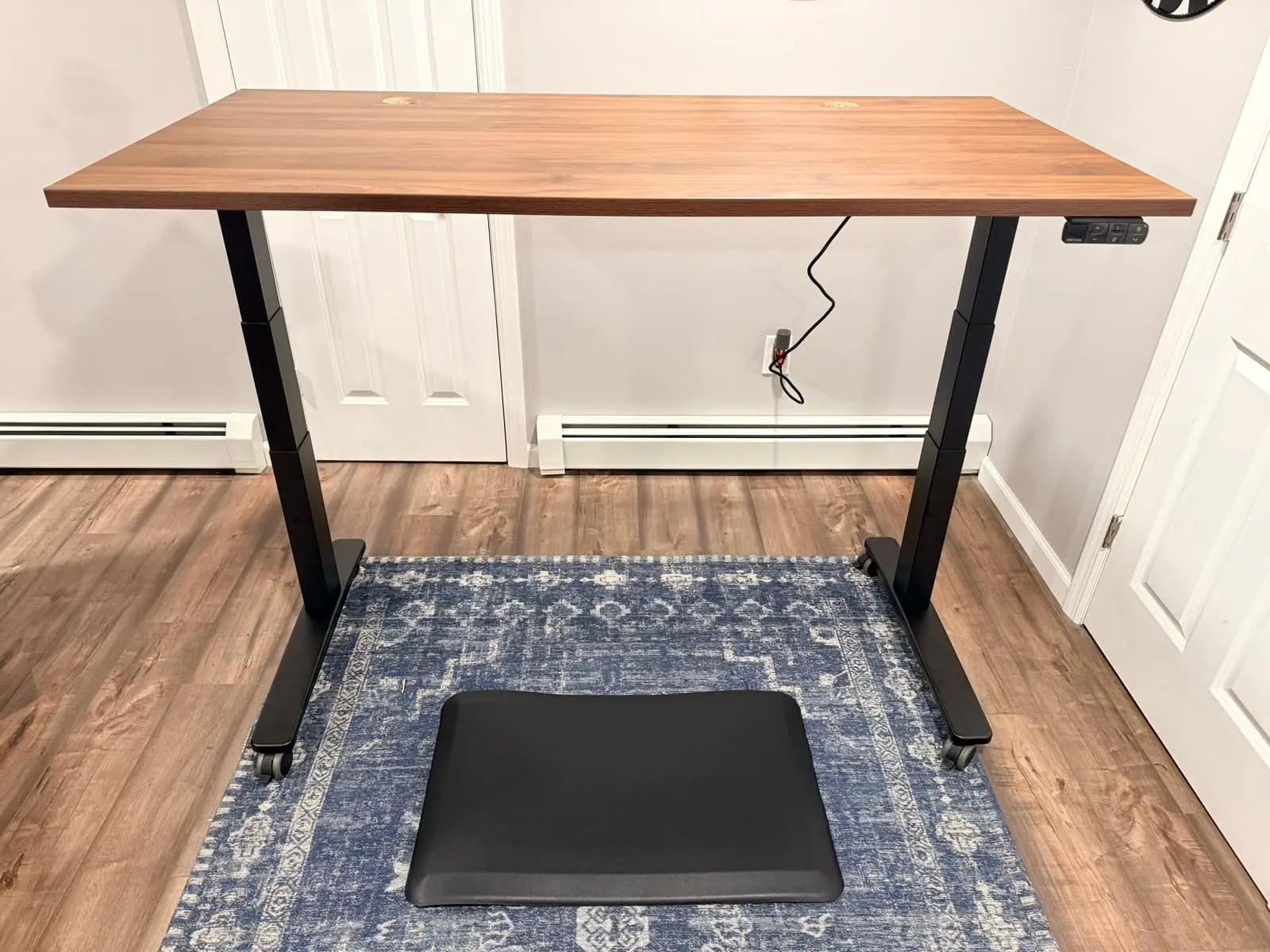
What the UPLIFT V3 Standing Desk Adds
The UPLIFT V3 Standing Desk is the centerpiece of the premium build. See our full UPLIFT V3 Standing Desk review for Matt's documented assembly and use. UPLIFT currently lists a 15-year desk warranty, 355 lb lift capacity, 22.6-to-48.7-inch height range, single-tool frame assembly, and included FlexMount cable management. Confirm the exact E6 Pro warranty and specifications at its current retailer instead of comparing the V3 with an older E6 Pro variant.
UPLIFT Desk offers a broad choice of desktop materials, including solid wood, bamboo, and laminate options. For the laminate versus bamboo versus solid wood split on the same V3 builder, see UPLIFT V3 desktop comparison. Measure your seated and standing elbow heights against the published range rather than relying on a population percentage. UPLIFT lists operation below 48 dB and a six-axis anti-collision sensor, but the sensor does not replace keeping people, pets, and equipment clear of the desk's travel path.

Why the UPLIFT Clarksville Chair
Compare the live UPLIFT Clarksville Ergonomic Chair price ($359) with the Sihoo Doro C300 price ($279.99−50%) rather than assuming they remain in the same range. The Clarksville comes from the same company as the desk, which gives the UPLIFT portion of this build one warranty and support path. It has a 300 lb weight capacity.
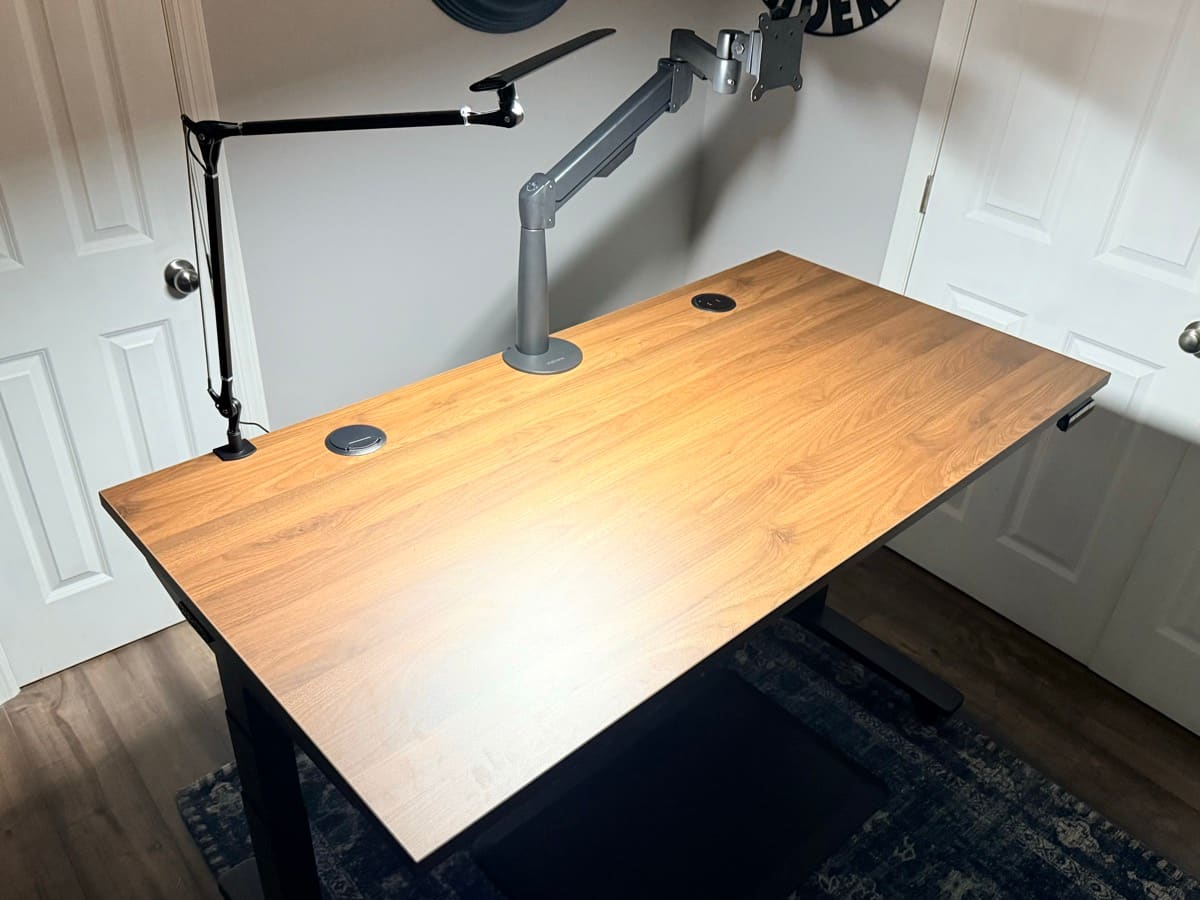
Why the Range-X Monitor Arm
The Range-X Single Monitor Arm by UPLIFT Desk ($139) supports compatible displays from 3.75 to 17.6 lbs, with 13.2 inches of height adjustment and 26.3 inches of reach. It uses a desk clamp or bolt-through mount, not the V3 frame's threaded accessory points. UPLIFT lists a 15-year warranty.
Warranty and Lifespan
UPLIFT's 15-year desk warranty is longer than the coverage listed on some E6 and E6 Pro configurations, but warranty length is not a service-life forecast or a payback calculation. Compare the exact current warranty terms, exclusions, return policy, and live prices. Do not divide price by warranty years as if every product fails when coverage ends.
Upgrade Priority If You Start with the Budget Build
If you can't buy the full premium build at once, use this order only when it matches the constraint you are trying to solve:
- Desk first → UPLIFT V3 Standing Desk ($599-$939), if its documented height range, capacity, cable system, or warranty solves a limitation in your current desk.
- Monitor arm second → Range-X by UPLIFT Desk ($139), if your current monitor stand cannot reach a usable seated and standing position. See our monitor arm guide for more options.
- Chair third: UPLIFT Clarksville ($359) or a higher-budget premium chair. Compare ergonomic chair upgrades before spending more.
- Mouse last → Logitech MX Master 4 ($119.99) for power users, or the UPLIFT Desk Wave Vertical Mouse ($34+) if wrist discomfort is a concern. See our wireless mouse guide.
Buying Tips
-
Check current promotions, but do not assume a sale. Compare the live total and exact configuration when you are ready to buy. A named shopping event does not guarantee a lower bundle price.
-
Start with the desk and chair if they solve the biggest fit constraints. Add the monitor arm next when the current stand cannot reach a usable position, then consider the peripherals.
-
Verify the exact FlexiSpot configuration and purchase channel. E6 and E6 Pro names have been used across multiple configurations, and warranty or return terms can differ by model, seller, country, and retailer.
-
Check the UPLIFT V3 product page for the premium build. Review the current configuration price, shipping terms, return policy, and 15-year warranty terms before ordering.
-
Order the correct mouse size. The Logitech M650 comes in Regular and Large. Compare your hand measurements and grip with Logitech's current sizing guidance, then use the return period if the fit feels cramped.
-
Set up the monitor arm before loading the desk. Mount the clamp and route cables along the arm before placing your monitor, keyboard, and other equipment on the desk. Reorganizing cables under a fully loaded desk is frustrating.
-
Use memory presets if the exact desk keypad includes them. Save only positions you have measured and found usable. The number of presets varies across E6 and E6 Pro configurations.
Frequently Asked Questions
Can this setup really come in under $1,000?
It can, but the title is a target rather than a price guarantee. Add the six live prices above and include the exact desktop configuration, shipping, and tax. If the total exceeds $1,000, delay the desk mat or reuse an input device you already own instead of assuming a future sale.
Is it worth getting a standing desk at this budget, or should I spend more on the chair instead?
A standing desk adds position choice, while a chair addresses seated support. Neither guarantees a health outcome, and the better first purchase depends on the current problem. If your chair does not fit, prioritize the chair. If your work surface cannot reach your seated elbow height, prioritize the desk.
Will the FlexiSpot E6 Pro capacity be enough?
Do not assume every E6 Pro has a 330 lb limit. Confirm the capacity for the exact linked configuration, then include the desktop and every mounted item in your load estimate. If you need more published headroom, the UPLIFT V3 lists a 355 lb lifting capacity.
How does the North Bayou F80 compare to the Ergotron LX?
The Ergotron LX ($150-200) has a higher published weight limit and longer warranty than the North Bayou F80 (unavailable). The F80 costs less when the live prices are checked. WorkstationSetup has not hands-on tested their motion or durability side by side. The Range-X by UPLIFT Desk ($139) is another option for compatible displays from 3.75 to 17.6 lbs.
Do I need anything else beyond these six products to start working?
You'll still need a computer and monitor. Optional additions include an anti-fatigue mat for standing sessions, a desk lamp for supplemental lighting, and a cable management kit. Add them only after the core setup and live total are clear.
How long will this setup last?
This guide does not have enough long-term evidence to predict a service life for the full setup. A warranty states the coverage period and terms, not how long a product will last. Keep receipts, follow load limits, and evaluate each product's current warranty and replacement parts before buying.
Should I go with the budget build or the UPLIFT premium build?
If you're on a strict $1,000 budget, start by adding the six current prices. Consider the premium build when the UPLIFT products' documented range, capacity, mounting options, hands-on evidence, or warranty terms solve a specific need. The 15-year warranty alone does not prove payback or eliminate future replacement risk.
The UPLIFT Desk premium build includes the hands-on evidence described above. Other products are research-backed unless this guide explicitly says otherwise. Some UPLIFT Desk products were provided for review. This post contains affiliate links.
Related Guides
- FlexiSpot E6 Pro vs UPLIFT V3: Budget complete desk vs the workstation V3
- FlexiSpot E6 Pro vs E7 Pro: Budget complete desk vs the current configurable E7 Pro
- FlexiSpot E7 Pro vs E7 Plus Max: Two-motor E7 Pro vs four-motor E7 Plus Max, not vs V3
- Best Standing Desks Under $700: Full desk comparison including UPLIFT V3
- UPLIFT V3 Standing Desk Review: Hands-on V3 notes behind the premium desk
- IKEA Standing Desk vs UPLIFT: Store-pickup sit/stand vs the V3
- FlexiSpot E7 Pro vs UPLIFT V3: Dual-motor spec comparison
- Best Ergonomic Chairs Under $400: Chair options at every price point
- Best Ergonomic Chairs Under $600: Broader chair field including Clarksville
- UPLIFT Clarksville vs Sihoo C300: Hands-on foam seat vs the budget-build C300
- UPLIFT Clarksville vs Sihoo C300 Pro V2: The same Clarksville against the current V2
- UPLIFT Clarksville vs Sihoo C300 Pro: Hands-on foam seat vs the research-backed Pro
- UPLIFT V3 Desktop Comparison: Laminate vs bamboo vs solid wood on the V3 builder
- Best Monitor Arms for Desk Space: From budget to premium arms
- Best Desk Mats for Home Office: Surface protection and style
- Best Ergonomic Keyboards for Home Office: Keyboard options beyond the Wave Keys
- Best Wireless Mouse for Productivity: Mouse upgrades including vertical options
- Best Desk Lamps for Home Office: Complete your lighting setup
- Best Ergonomic Desk Setup: Complete Guide: Full workstation walkthrough
- Complete Home Office Setup Under $500: Tighter budget alternative