




A budget work mouse has one job: disappear. Quiet enough that nobody on a call hears you, comfortable enough that you forget it by lunch, and cheap enough that losing it in a bag isn't a tragedy. What you give up against a hundred-dollar mouse is three-device switching, glass tracking, and a drawer of programmable buttons. Most office desks don't miss any of that.
The five picks below all come in well under the price of an MX Master, and they split by hand size and by whether your wrist needs a vertical. If you want the whole range including the expensive shells, start with the full best mouse for work guide.
Five Budget Mice at a Glance
| Job | Pick | Price | Why |
|---|---|---|---|
| Quiet default, two sizes, left option | Signature M650 | $39.99 | SilentTouch, SmartWheel, Bluetooth or Bolt, two years on one AA |
| Budget vertical, three devices | ProtoArc EM11 NL | $24.99 | Rechargeable, Bluetooth plus receiver |
| Cheapest vertical test | Anker Vertical | $29.99 | Receiver only, prove the posture |
| Lowest price, compact | UPLIFT Swell | $30+ | Smaller hands, ships with the desk |
| UPLIFT cart, left or right | UPLIFT Wave | $34+ | Left-hand version, no second checkout |
What a Cheap Mouse Gives Up, and What It Doesn't
The things that separate a budget mouse from an MX Master are specific: three-device switching, a sensor that tracks on glass, a free-spinning metal wheel, and a set of programmable buttons. If your day is a browser, email, a spreadsheet, and video calls on one computer, none of those change the work.
What a budget mouse should not give up is fit and quiet. A mouse that's the wrong size for your hand costs you comfort every hour regardless of price, which is why the M650's two shell sizes matter more than its DPI figure. And on calls, ordinary clicks are audible to everyone on the line. The M650's SilentTouch clicks and the ProtoArc's quiet left and right buttons solve that; the Anker doesn't.
One practical check: a locked-down work laptop that bans USB receivers. The M650 and ProtoArc pair over Bluetooth. The Anker is receiver-only.
Logitech Signature M650: Quiet Default, Two Sizes, Left Option

Quiet default, two sizes, left option
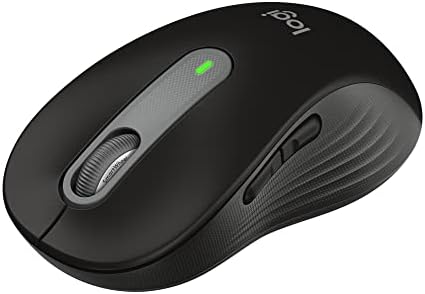
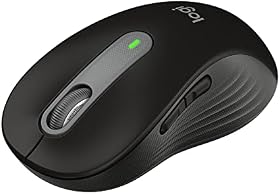
Logitech Signature M650 Wireless Mouse
Logitech · Model 910-006268
- Shape
- Flat contoured
- Sizes
- Regular or Large
- Handedness
- Right or left
- Devices
- 1
- Power
- 1 AA, up to 24 months
- Weight
- 101 g / 115 g
- SilentTouch clicks; Logitech lists 90 percent less click noise.
- SmartWheel switches between line-by-line and free-spin scrolling.
- Bluetooth Low Energy or a Logi Bolt receiver, so it works on a laptop that bans USB dongles.
- Regular and Large shells, plus a left-handed Large model.
- Side buttons customizable in Logi Options+.
Working for it
- SmartWheel scrolling switches between ratchet and free-spin
- Silent clicks reduce noise in quiet offices
- Available in left-hand version and two sizes
Working against it
- No USB-C charging — uses AA battery
- Fewer programmable buttons than MX Master series
Buy it if
Your work is email, browser, and calls, you want a quiet mouse that fits your hand size, or you need a cheap left-handed option.
Skip it if
You switch between computers all day or you work on a glass desk. That's what MX Master money buys.
Instead: The ProtoArc if your wrist is the problem rather than your budget. The MX Master 4 if you need three devices and glass tracking.
Price checked Sep 5 · At Amazon · Affiliate link
The Signature M650 is the budget work mouse to buy unless you have a reason not to. SilentTouch clicks (Logitech's figure is 90 percent less click noise than a standard mouse), a SmartWheel that flips between line-by-line and free-spin, Bluetooth or a Logi Bolt receiver, and up to two years on one AA.
The detail that matters most is the two shells. The Regular fits small to medium hands and the Large fits larger ones, and there's a left-handed Large, which makes it the cheapest sensible left-hand flat mouse you can buy. Two side buttons take custom assignments in Logi Options+. It doesn't switch between computers and it won't track on glass; if you need either, that's the MX Master 4.
Price: $39.99
ProtoArc EM11 NL: Budget Vertical, Rechargeable, Three Devices

Budget vertical, rechargeable, three devices
ProtoArc EM11 NL Vertical Mouse
ProtoArc · Model EM11 NL
- Shape
- Vertical
- Hands
- Under 7.5 in, right
- Devices
- 2 Bluetooth + USB-A
- Sensor
- 1,000 / 1,600 / 2,400 DPI
- Power
- 500 mAh, USB-C cable
- Warranty
- 2 years listed
- Pairs to three devices, two over Bluetooth and one over the included USB-A receiver.
- Rechargeable through the included USB-C cable. No batteries to buy.
- ProtoArc sizes it for hand lengths under 7.5 inches and says to measure first.
- Left and right clicks are quiet. The scroll wheel and side buttons are not.
- ProtoArc's own listing says to allow one to two weeks to adjust to the shape.
Working for it
- Connects to up to 3 devices with dual Bluetooth plus 2.4GHz USB-A
- Rechargeable 500mAh battery with USB-C charging cable
- Quiet left and right clicks for shared workspaces
Working against it
- Forward and back buttons are not compatible with macOS
- Designed for small to medium hands only
- Buttons are not programmable
Buy it if
You want a rechargeable vertical that hops between a work laptop and a personal machine without spending Logitech money.
Skip it if
You're on a Mac and rely on back and forward side buttons, you want programmable buttons, or your hands are large.
Instead: Mac users with side-button habits should save for the Logitech Lift. Large hands go to the MX Vertical.
Price checked Sep 5 · At Amazon · Affiliate link
The ProtoArc EM11 NL is the pick when your wrist is the complaint rather than your budget. It's a vertical mouse that pairs to three devices, two over Bluetooth and one over the included USB-A receiver, and it charges from a USB-C cable instead of eating batteries. ProtoArc sizes it for hand lengths under 7.5 inches and tells you to measure first.
The caveats: the back and forward side buttons don't work on macOS, the buttons aren't programmable, and only the left and right clicks are quiet. For a Windows user with small to medium hands, it's a rechargeable, three-device vertical for very little money. If the shape works and you want quieter, more polished hardware later, the Lift is the upgrade.
Price: $24.99
Anker Vertical Mouse: Cheapest Way to Try Vertical

Cheapest way to try vertical
Anker Wireless Vertical Ergonomic Mouse
Anker · Model AK-98ANWVM-UBA
- Shape
- Vertical
- Handedness
- Right
- Connection
- 2.4 GHz USB-A receiver
- Sensor
- 800 / 1,200 / 1,600 DPI
- Power
- 2 AAA, not included
- Warranty
- 18 months listed
- The long-running budget vertical. Receiver stores in the base.
- Three DPI steps cover browsing and office work.
- Sleeps after eight minutes idle; a click wakes it.
- Anker lists an 18-month warranty.
Working for it
- Low-cost vertical shape from a known accessory brand
- 800/1200/1600 DPI settings cover basic office work
- 18-month warranty listed by Anker
Working against it
- Requires 2 AAA batteries, not included
- USB-A receiver only with no Bluetooth multi-device switching
- Lower DPI ceiling than premium Logitech options
Buy it if
You want the least expensive way to find out whether a handshake grip helps your wrist.
Skip it if
You need Bluetooth, multi-device switching, or quiet clicks. This is a receiver-only mouse with ordinary clicks.
Instead: The ProtoArc adds Bluetooth, three devices, and USB-C charging for a few dollars more.
Price checked Sep 5 · At Amazon · Affiliate link
The Anker Vertical Mouse is the least expensive answer to one question: does a handshake grip help my wrist? It runs on a 2.4 GHz receiver that stores in the base, takes two AAA batteries you supply, and offers three DPI steps.
No Bluetooth, no multi-device switching, ordinary clicks. If the answer to the question is yes, the ProtoArc adds Bluetooth, three devices, and USB-C charging for a few dollars more, and the Lift adds quiet clicks and Logitech's software.
Price: $29.99
UPLIFT Swell Vertical Mouse: Lowest Price, Compact

Lowest price, compact
Swell Vertical Ergonomic Mouse by UPLIFT Desk
UPLIFT Desk
- Shape
- Vertical, compact
- Handedness
- Right
- Store
- UPLIFT Desk
- The smaller UPLIFT vertical, sized for smaller hands.
- The lowest-priced mouse in this guide.
- Ships in the same UPLIFT Desk order as a desk or monitor arm.
Working for it
- Most affordable vertical mouse option at $30
- Compact design for smaller hands
- Wireless connectivity
Working against it
- Right-hand only
- Fewer features than Logitech vertical mice
Buy it if
Your hands are small, you want a vertical to travel with or to try, and you're checking out at UPLIFT Desk anyway.
Skip it if
You're left-handed (the Wave has a left version) or you want any multi-device or software features.
Instead: The Wave for a left hand. The M650 if you'd rather stay with a flat shell.
Price checked Sep 5 · At UPLIFT Desk · Affiliate link
The Swell Vertical Mouse is the lowest-priced mouse in this guide and the smallest. It's a compact vertical sized for smaller hands, right-hand only, and it ships with the rest of an UPLIFT Desk order. If you're buying a desk or monitor arm there anyway and want a vertical to try, it's the cheapest door in.
Price: $30+
UPLIFT Wave Vertical Mouse: UPLIFT Cart, Left or Right

UPLIFT cart, left or right
Wave Vertical Ergonomic Mouse by UPLIFT Desk
UPLIFT Desk
- Shape
- Vertical
- Handedness
- Right or left version
- Store
- UPLIFT Desk
- Sold by UPLIFT Desk, so it ships with a standing desk order instead of a second checkout.
- Right-hand and left-hand versions.
- A straightforward vertical without a software layer to manage.
Working for it
- Available in right and left-handed versions
- Vertical design reduces forearm pronation
- Budget-friendly at $34
Working against it
- No multi-device switching
- Lower DPI than Logitech MX series
Buy it if
You're already building an UPLIFT Desk order, you want a left-hand vertical, and you'd rather not run a second app for a mouse.
Skip it if
You want multi-device switching, high DPI, or Logitech's software polish.
Instead: The Lift is the closest Logitech equivalent with quiet clicks and three-device switching, at a higher price.
Price checked Sep 5 · At UPLIFT Desk · Affiliate link
The Wave Vertical Mouse is the full-size UPLIFT vertical, and it comes in right-hand and left-hand versions, which is rare at any price. It's a straightforward mouse with no software layer, and it ships in the same order as a standing desk.
It isn't competing with Logitech on features. It's competing on convenience and handedness, and on both it wins for anyone already at the UPLIFT checkout.
Price: $34+
How to Pick a Budget Mouse for the Office
- Measure your hand. Wrist crease to middle fingertip. Under 6.5 inches is small, 6.5 to 7.5 is medium, over 7.5 is large. Buy the M650 Regular for small and medium, the Large for large.
- Decide on flat or vertical. Flat is faster to learn and fine for most people. Vertical is for a forearm that ends the day twisted; give it one to two weeks. Best ergonomic mouse for wrist pain goes deeper.
- Check your laptop's USB policy. If receivers are banned, you need Bluetooth: the M650 or ProtoArc.
- Count your computers. One computer, buy the M650. A work laptop plus a personal machine, the ProtoArc switches between them. Three machines with a Mac in the mix is where you start looking at the MX Master 4.
- Listen to your clicks. If you're on calls, buy quiet: the M650 or ProtoArc.
Frequently Asked Questions
What is the best budget mouse for office work?
The Logitech Signature M650. Quiet SilentTouch clicks, a scroll wheel that switches between line-by-line and free-spin, Bluetooth or a Logi Bolt receiver, up to two years on one AA battery, and Regular or Large shells with a left-handed Large option.
Is a cheap mouse good enough for work?
For one computer and a day of browser, email, spreadsheets, and calls, yes. What you give up against an MX Master is three-device switching, glass tracking, a free-spin metal wheel, and programmable buttons. If your work doesn't use those, the money buys nothing.
What is the best cheap vertical mouse?
The ProtoArc EM11 NL for a rechargeable vertical that pairs to three devices, sized for hands under 7.5 inches. The Anker Vertical is cheaper still but receiver-only with ordinary clicks.
Which budget mouse is quiet enough for video calls?
The Signature M650, which Logitech lists at 90 percent less click noise than a standard mouse. The ProtoArc's left and right clicks are quiet, though its wheel and side buttons aren't. The Anker has standard clicks.
Is there a cheap left-handed mouse for work?
The Signature M650 in the Large size comes in a left-handed version. The UPLIFT Wave is a left-hand vertical option. The ProtoArc, Anker, and Swell are right-hand designs.
Does a budget mouse work with a work laptop that blocks USB dongles?
If it pairs over Bluetooth, yes. The Signature M650 and the ProtoArc EM11 NL both do. The Anker Vertical needs its USB-A receiver.
Related Guides
- Best Wireless Mouse for Work by Grip and Hand Size
- Best Ergonomic Mouse for Wrist Pain
- Best Multi-Device Mouse for Two Computers
- Complete Home Office Setup Under $500
- Best Ergonomic Keyboards for Home Office
Amazon and UPLIFT Desk links are affiliate links.