



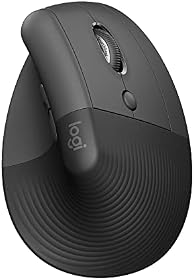


Two computers on one desk usually means a work laptop and a personal machine, and the mouse is the first thing people want to share. There are three ways to do it. A button on the mouse that hops between paired computers. Software that lets the cursor slide off one screen onto the other machine's screen. Or a hardware switch that moves the keyboard, mouse, and monitor together.
The first two are mouse features, and this guide sorts the mice that have them by hand and by budget. The third is a KVM, and if you also need a shared monitor or keyboard, that's the answer: start with KVM switch setup for two computers. If you'd rather not buy hardware at all, Mouse Without Borders vs Logitech Flow vs Synergy covers the software route with any mouse.
Six Multi-Device Mice at a Glance
| Job | Pick | Price | Why |
|---|---|---|---|
| Mac plus Windows, files follow | MX Master 4 | $119.99 | Easy-Switch, Flow, quiet clicks, glass tracking |
| Same Flow, physical thumb wheel | MX Master 3S | $85-$100 | Same sensor and switching; buy on price |
| Two computers and a sore wrist | Lift | $69.99 | 57° vertical, Easy-Switch, Flow, left version |
| Vertical with Flow, larger hands | MX Vertical | $99.99 | Taller body, USB-C, Flow |
| Budget button switching | ProtoArc EM11 NL | $24.99 | Three devices, no network needed |
| Discontinued classic | M720 Triathlon | Check the listing first |
Easy-Switch vs Flow vs a KVM: Which One You Need
Easy-Switch is a button, usually on the underside of a Logitech mouse, that cycles between up to three paired computers. Press it, the mouse talks to the other machine. It works over Bluetooth or a receiver, needs no software and no network, and it's the feature every mouse in this guide has in some form. The ProtoArc calls its version a mode button; the idea is the same.
Flow is software in Logi Options+. Install it on each computer, put them on the same network, and the cursor slides off the edge of one screen onto the other computer's screen, switching the mouse automatically. Copy text, an image, or a file on the Mac and paste it on the PC. It's the most natural way to run two machines from one mouse, and it needs a Flow-capable Logitech mouse: the MX Master 4, MX Master 3S, Lift, and MX Vertical here all qualify. It also needs IT to allow the software and the network path, which is the usual reason it fails on a locked-down work laptop.
A KVM is a box. It switches the monitor, keyboard, and mouse together, with any mouse you own, and it's what you want when the shared thing isn't just the mouse. The trade is cabling and the occasional window-shuffle when you switch; why a KVM rearranges windows explains that one. For a Mac and a Windows machine on USB-C, best USB-C KVM for Mac and Windows is the shortlist.
The mouse choice, then, is a hand-fit question with one filter: do you want Flow, or is button switching enough?
Logitech MX Master 4: Mac Plus Windows, Files Follow
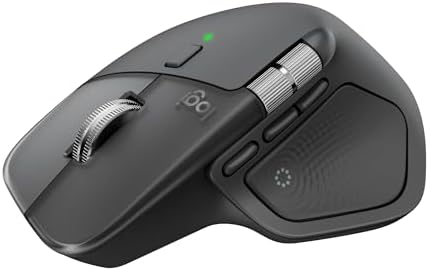
Mac plus Windows, files follow
Logitech MX Master 4 Wireless Mouse
Logitech · Model 910-007558
- Devices
- 3, Easy-Switch + Flow
- Shape
- Flat palm shell
- Hands
- Medium to large, right
- Sensor
- 8,000 DPI on glass
- Power
- USB-C rechargeable
- Warranty
- 2 years listed
- Easy-Switch pairs up to three computers; Flow lets the cursor cross between them and carries clipboard and files.
- Haptic Sense Panel under the thumb gives customizable feedback on shortcuts and actions.
- Actions Ring pops an app-aware shortcut overlay at the cursor.
- MagSpeed wheel free-spins through long sheets and stops on a line.
- USB-C receiver plus Bluetooth; Logitech claims stronger connectivity than the 3S.
Working for it
- Upgraded 8K DPI sensor for precision on any surface including glass
- USB-C charging with fast-charge (1 min = 3 hours use)
- Quieter clicks reduce noise in shared office spaces
Working against it
- Incremental upgrade may not justify cost for 3S owners
- Still right-hand only with no left-hand option
Buy it if
You run a Mac and a Windows machine side by side, you want the cursor to slide between them, and your desk is glass or a busy laminate.
Skip it if
You're left-handed, your hands run small, or your two computers are on networks that can't see each other. Flow needs a shared network.
Instead: Small hands or a sore wrist go to the Lift, which keeps Flow. Flow blocked by IT? The ProtoArc's button switching doesn't need a network.
Price checked Sep 2 · At Amazon · Affiliate link
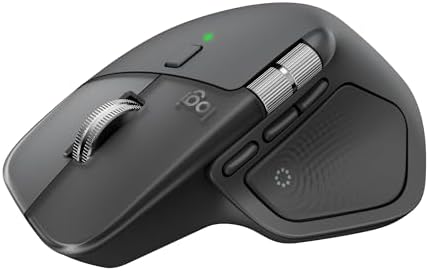
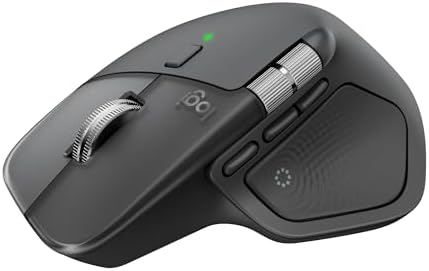
The MX Master 4 is the default when the two computers are a Mac and a Windows PC on the same desk. Easy-Switch pairs it to three machines, and Flow lets the cursor cross from one screen to the other with the clipboard and files following. The clicks are quiet, the MagSpeed wheel handles long spreadsheets, and the Darkfield sensor tracks on glass, which matters more than it sounds when two laptops crowd one desk and the mouse ends up on whatever surface is left.
New over the 3S: the Haptic Sense Panel under the thumb, the Actions Ring overlay, and a two-year listed warranty against one. Who should skip it: lefties, small hands, and anyone whose IT department blocks Logi Options+ or keeps the two machines on separate networks. Flow can't cross a network it can't see. MX Master 4 vs MX Master 3S settles the version question.
Price: $119.99
Logitech MX Master 3S: Same Flow, Physical Thumb Wheel

Same Flow, physical thumb wheel
Logitech MX Master 3S
Logitech · Model 910-006557
- Devices
- 3, Easy-Switch + Flow
- Shape
- Flat palm shell
- Hands
- Medium to large, right
- Sensor
- 8,000 DPI on glass
- Power
- USB-C, up to 70 days
- Weight
- 141 g
- Same 8,000 DPI Darkfield sensor, MagSpeed wheel, and Easy-Switch as the MX Master 4.
- Physical thumb wheel instead of the haptic panel. Some hands prefer it.
- Quiet Clicks; Logitech lists 90 percent less click noise than the MX Master 3.
- Up to 70 days on a full charge, USB-C.
Working for it
- 8,000 DPI Darkfield sensor tracks on any surface including glass
- MagSpeed scroll wheel with free-spin mode
- 70-day battery with USB-C fast charging
Working against it
- Right-hand only design
- No haptic scroll or Actions Ring (MX Master 4 features)
Buy it if
You want Flow and the MX Master shell, and the 3S is sitting clearly below the 4.
Skip it if
The price gap has closed, in which case the 4's longer listed warranty and newer controls are the better buy.
Instead: The MX Master 4 when the prices are close.
Price checked Sep 5 · At Amazon · Affiliate link
The MX Master 3S does the two-computer job identically: three devices on Easy-Switch, Flow across them, the same 8,000 DPI Darkfield sensor, Quiet Clicks. What it keeps is a physical thumb wheel where the 4 has a haptic panel, and some hands prefer that.
The reason to buy it is price, and it moves. When it sits well under the 4, it's the smarter buy for the same daily experience. When the gap closes, take the 4's longer listed warranty. Check the live price on the card.
Price: $85-$100
Logitech Lift: Two Computers and a Sore Wrist
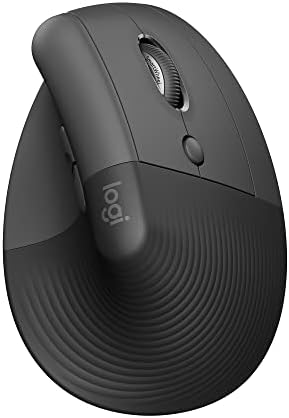
Two computers and a sore wrist
Logitech Lift Vertical Ergonomic Mouse
Logitech · Model 910-006466
- Devices
- 3, Easy-Switch + Flow
- Angle
- 57° vertical
- Hands
- Small to medium
- Handedness
- Right or left version
- Power
- 1 AA, up to 24 months
- Weight
- 125 g
- Easy-Switch across three devices over Bluetooth Low Energy or Logi Bolt, with Flow between a Mac and a Windows machine.
- 57-degree angle puts the forearm closer to a handshake, which is the whole point of a vertical.
- Logitech sizes it for small to medium hands. Large hands should look at the MX Vertical.
- A dedicated left-handed model exists, which is rare in this category.
- Whisper-quiet clicks and a SmartWheel that shifts between ratchet and free-spin.
Working for it
- 57-degree vertical angle reduces forearm pronation
- Available in dedicated left-handed model
- SilentTouch quiet clicks for shared workspaces
- 24-month AA battery life
Working against it
- Designed for small to medium hands only
- No Darkfield sensor, won't track on glass
Buy it if
You share one mouse across two or three computers and a flat mouse leaves your wrist sore.
Skip it if
You have large hands or you need glass tracking. Neither vertical here tracks on glass.
Instead: Larger hands go to the MX Vertical, which keeps Flow. Glass desks go to the MX Master 4.
Price checked Sep 2 · At Amazon · Affiliate link
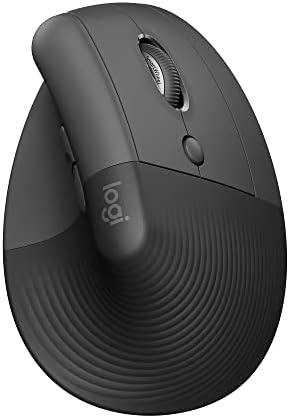
The Lift is the answer when you need one mouse across two or three computers and a flat mouse leaves your wrist sore. It's a 57-degree vertical with Easy-Switch across three devices and Flow between a Mac and a Windows machine, sized for small to medium hands, quiet on calls, and sold in a left-handed version.
What it gives up against the MX Master is glass tracking and the button count. What it gives up against nothing is the multi-device job, which it does in full. Large hands should read Lift vs MX Vertical before buying.
Price: $69.99
Logitech MX Vertical: Vertical With Flow, Larger Hands

Vertical with Flow, larger hands
Logitech MX Vertical
Logitech · Model 910-005447
- Devices
- 3, Easy-Switch + Flow
- Angle
- 57° vertical
- Hands
- Medium to large, right
- Sensor
- 4,000 DPI, speed switch
- Power
- USB-C rechargeable
- Weight
- 135 g
- Easy-Switch across three devices plus Flow, in a taller vertical body.
- Same 57-degree handshake angle as the Lift for medium to large hands.
- Cursor speed switch on top changes DPI without opening software.
- USB-C charging; Logitech lists about a minute of charge for roughly three hours of use.
Working for it
- 57-degree vertical angle reduces forearm pronation
- 4,000 DPI Darkfield sensor tracks on glass
- USB-C rechargeable with 4-month battery life
Working against it
- Right-hand only, no left-hand version
- Larger and heavier than the Logitech Lift
Buy it if
You need Flow across two computers, your hand is medium to large, and the Lift felt cramped.
Skip it if
You're left-handed or you're on calls all day and need quiet clicks. The MX Vertical's clicks are standard.
Instead: The Lift for smaller hands, lefties, or quiet clicks.
Price checked Sep 3 · At Amazon · Affiliate link
The MX Vertical is the Lift's job for medium to large hands: the same 57-degree angle in a taller body, Easy-Switch across three devices, Flow, USB-C charging, and a DPI switch on top. Right-hand only, and the clicks are standard rather than quiet, which matters if the two computers are both on calls all day.
Price: $99.99
ProtoArc EM11 NL: Budget Button Switching

Budget button switching
ProtoArc EM11 NL Vertical Mouse
ProtoArc · Model EM11 NL
- Devices
- 2 Bluetooth + USB-A
- Shape
- Vertical
- Hands
- Under 7.5 in, right
- Sensor
- 1,000 / 1,600 / 2,400 DPI
- Power
- 500 mAh, USB-C cable
- Warranty
- 2 years listed
- Pairs to three devices, two over Bluetooth and one over the included USB-A receiver, switched with a button.
- No network needed, so it works where Flow is blocked by IT policy.
- Rechargeable through the included USB-C cable.
- ProtoArc sizes it for hand lengths under 7.5 inches and says to measure first.
- Left and right clicks are quiet. The scroll wheel and side buttons are not.
Working for it
- Connects to up to 3 devices with dual Bluetooth plus 2.4GHz USB-A
- Rechargeable 500mAh battery with USB-C charging cable
- Quiet left and right clicks for shared workspaces
Working against it
- Forward and back buttons are not compatible with macOS
- Designed for small to medium hands only
- Buttons are not programmable
Buy it if
You want a work laptop and a personal machine on one mouse, your IT department blocks software like Flow, and you'd rather not spend Logitech money.
Skip it if
You need the cursor to cross screens, you're on a Mac and rely on side buttons, or your hands are large.
Instead: The Lift adds Flow, quiet clicks, and Logitech's software. The MX Master 4 adds glass tracking.
Price checked Sep 5 · At Amazon · Affiliate link
The ProtoArc EM11 NL is here because it solves the two-computer problem without software or a network. A button on the mouse cycles between two Bluetooth devices and one USB-A receiver, so a locked-down work laptop that blocks Logi Options+ is no obstacle. It charges over USB-C, it's a vertical shape sized for hands under 7.5 inches, and it costs a fraction of the Logitech options.
The limits: no Flow, so the cursor doesn't cross screens; the side buttons don't work on macOS; and only the left and right clicks are quiet. For a Windows user with a work laptop and a home PC, it's the cheap, honest way to share one mouse.
Price: $24.99
Logitech M720 Triathlon: Discontinued Three-Device Classic

Discontinued three-device classic
Logitech M720 Triathlon
Logitech · Model 910-004790
- Devices
- 3 via Easy-Switch
- Shape
- Flat contoured
- Connection
- Bluetooth or Unifying
- Sensor
- 1,000 DPI
- Power
- 1 AA, up to 24 months
- Status
- Discontinued by Logitech
- For years this was the cheap way to get three-device Easy-Switch.
- Eight buttons, programmable in Logi Options+.
- The listing now reads discontinued by the manufacturer, and stock comes and goes.
Working for it
- Easy-Switch connects to 3 devices simultaneously
- 24-month battery life with single AA
- 8 programmable buttons via Logi Options+
Working against it
- 1,000 DPI sensor, lower than MX Master series
- No glass tracking capability
Buy it if
You find one at a sane price from a seller you trust and you only need button switching across three machines.
Skip it if
The listing shows no stock or a marked-up third-party price. Don't chase it.
Instead: The ProtoArc for three-device switching at a similar budget, or the Lift and MX Master line for current, in-production hardware.
Price checked Sep 5 · At Amazon · Affiliate link
For years the M720 Triathlon was the cheap three-device mouse, with Easy-Switch over Bluetooth or a Unifying receiver and two years on one AA. Logitech has discontinued it, and stock now comes and goes at whatever price a third-party seller sets. It stays in this guide because people still search for it.
If you find one at a normal price from a seller you trust, it still does the job. If you don't, the ProtoArc does the same button switching on current hardware, and the Lift adds Flow.
Price:
How to Choose a Mouse for Two Computers
- Decide whether you want the cursor to cross screens. If yes, you want Flow, which means the MX Master 4, MX Master 3S, Lift, or MX Vertical, plus Logi Options+ on both machines and a shared network. If a button is fine, every mouse here works, including the ProtoArc.
- Check what IT allows. If your work laptop blocks third-party software or sits on a separate network, Flow won't run. Button switching still will.
- Measure your hand. Wrist crease to middle fingertip. Under 6.5 inches is small, 6.5 to 7.5 is medium, over 7.5 is large. The MX Master shells are medium to large; the Lift is small to medium.
- Decide flat or vertical. A sore wrist points to the Lift or MX Vertical, which keep Flow. Otherwise the MX Master is faster to learn and carries more shortcuts.
- Ask whether the mouse is really the problem. If you also want one keyboard and one monitor to follow you, buy a KVM and any mouse you like. KVM switch setup walks through the wiring.
Frequently Asked Questions
What is the best mouse for two computers?
The Logitech MX Master 4. Easy-Switch pairs it to three computers, and Flow lets the cursor cross from a Mac to a Windows PC with the clipboard and files following. If your wrist needs a vertical, the Lift does the same switching. On a budget, the ProtoArc EM11 NL switches three devices with a button.
What is the difference between Easy-Switch and Flow?
Easy-Switch is a button on the mouse that cycles between paired computers; it needs no software or network. Flow is Logitech software that lets the cursor slide from one computer's screen onto another's, switching automatically and carrying copy and paste, including files. Flow needs Logi Options+ on each machine and a shared network.
Does Logitech Flow work between a Mac and a Windows PC?
Yes. Flow runs in Logi Options+ on both macOS and Windows, and the cursor, clipboard, and files move between them. The MX Master 4, MX Master 3S, Lift, and MX Vertical all support it.
Can I use one mouse on two computers without any software?
Yes, with a mouse that has a switching button. Every Logitech mouse here has Easy-Switch, and the ProtoArc EM11 NL has a mode button that cycles two Bluetooth devices and a receiver. Press it and the mouse moves to the other computer.
Is a KVM switch better than a multi-device mouse?
They solve different problems. A multi-device mouse shares the mouse only. A KVM switches the keyboard, mouse, and monitor together and works with any mouse. If you want the whole desk to follow you between computers, buy a KVM. If the mouse is the only thing you're sharing, a multi-device mouse is simpler and cheaper.
Which multi-device mouse works with a work laptop that blocks Logitech software?
Any of them for button switching, since Easy-Switch and the ProtoArc's mode button don't need software. Flow won't run if Logi Options+ is blocked, so if that's your situation, buy for the button and skip the Flow premium.
Which multi-device mouse is best for a sore wrist?
The Logitech Lift for small to medium hands, or the MX Vertical for larger hands. Both are 57-degree verticals with Easy-Switch across three devices and Flow. Best ergonomic mouse for wrist pain covers the whole vertical field.
Related Guides
- Best Wireless Mouse for Work by Grip and Hand Size
- KVM Switch Setup: Share One Desk, Two Computers
- Mouse Without Borders vs Logitech Flow vs Synergy
- Best USB-C KVM for Mac and Windows
- MX Master 4 vs MX Master 3S
- Best Ergonomic Mouse for Wrist Pain
Amazon links are affiliate links.