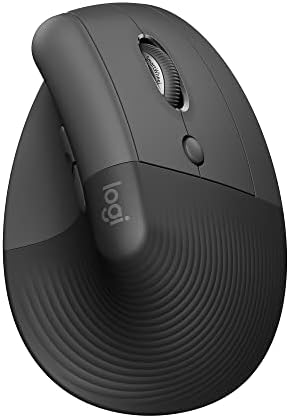
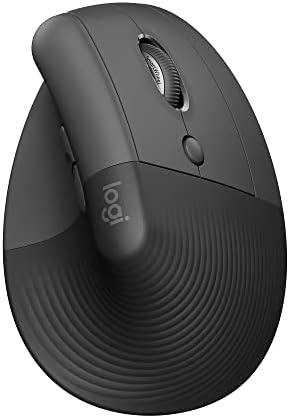




A flat mouse holds your forearm palm-down all day, with the two forearm bones crossed. A vertical mouse rolls the hand up toward a handshake so those bones sit closer to parallel. That's the entire idea, and it's why a vertical is the first thing to try when a normal mouse leaves your wrist sore by mid-afternoon.
The shape does nothing if it doesn't fit your hand, so this guide sorts six verticals by hand size first and budget second. If you're weighing the two Logitech models against each other, Lift vs MX Vertical goes deeper. If you're not sure you want vertical at all, the full best mouse for work guide covers flat shells too.
Six Vertical Mice at a Glance
| Hand | Pick | Price | Why |
|---|---|---|---|
| Small to medium, right or left | Logitech Lift | $69.99 | 57° angle, quiet clicks, three devices, left version |
| Medium to large, right | Logitech MX Vertical | $99.99 | Taller body, USB-C, DPI switch on top |
| Under 7.5 in, budget | ProtoArc EM11 NL | $24.99 | Rechargeable, three devices |
| Any, cheapest test | Anker Vertical | $29.99 | Receiver only, prove the posture |
| Left hand, UPLIFT cart | UPLIFT Wave | $34+ | Right or left, ships with the desk |
| Small, UPLIFT cart | UPLIFT Swell | $30+ | Compact, lowest price here |
Why a Vertical Mouse Changes How Your Wrist Feels
Hold your hand out flat, palm down, the way it sits on a normal mouse. Now turn it to shake someone's hand. The second position is what a vertical mouse holds you in. Logitech's Lift and MX Vertical are built at 57 degrees, which is most of the way to that handshake, and Logitech cites a 10 percent reduction in muscular activity on the MX Vertical compared with a standard mouse.
Two things follow from that. First, the mouse needs to fit. A vertical that's too large for your hand makes you claw at it; one that's too small makes you pinch. Both put tension right back where you were trying to remove it, which is why the fit matrix above comes before any spec. Second, the first week feels wrong. Your cursor will overshoot and your clicks will land oddly. Almost everyone who switches describes week one as clumsy and week two as normal. ProtoArc says the same on its own listing.
A vertical mouse is one variable. If your desk is too high, your keyboard forces your wrists to bend, or your chair puts your shoulders up, the mouse can't fix that. Ergonomic desk setup covers the rest of the chain. If pain persists or gets worse, see a clinician.
Logitech Lift: Small to Medium Hands, Left Version
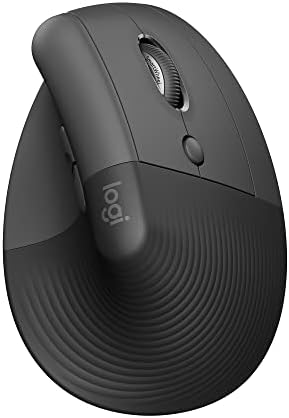
Small to medium hands, left version
Logitech Lift Vertical Ergonomic Mouse
Logitech · Model 910-006466
- Angle
- 57° vertical
- Hands
- Small to medium
- Handedness
- Right or left version
- Devices
- 3, Easy-Switch + Flow
- Power
- 1 AA, up to 24 months
- Weight
- 125 g
- 57-degree angle puts the forearm closer to a handshake, which is the whole point of a vertical.
- Logitech sizes it for small to medium hands. Large hands feel cramped and should look at the MX Vertical.
- A dedicated left-handed model exists, which is rare in this category.
- Whisper-quiet clicks and a SmartWheel that shifts between ratchet and free-spin.
- Bluetooth Low Energy or Logi Bolt, up to three devices, with Flow between a Mac and a Windows machine.
Working for it
- 57-degree vertical angle reduces forearm pronation
- Available in dedicated left-handed model
- SilentTouch quiet clicks for shared workspaces
- 24-month AA battery life
Working against it
- Designed for small to medium hands only
- No Darkfield sensor, won't track on glass
Buy it if
Your wrist or forearm aches after a normal mouse, your hand measures small to medium, or you need a left-handed vertical.
Skip it if
You have large hands, you need glass tracking, or you're not willing to give the shape a week or two of adjustment.
Instead: Larger hands go to the MX Vertical. If you just want to test whether vertical helps, the ProtoArc or Anker costs a fraction.
Price checked Sep 2 · At Amazon · Affiliate link
The Lift is the vertical most people should try first, because it's the one most hands actually fit. Logitech sizes it for small to medium hands, it comes in a proper left-handed version, and the 57-degree angle does the handshake job without the bulk of the MX Vertical.
It's quiet on calls, it runs up to two years on one AA, and it hops between three devices over Bluetooth or the Logi Bolt receiver, with Flow between a Mac and a Windows machine. What it doesn't do is track on glass, and it isn't for large hands. If your fingers wrap past the buttons, look at the MX Vertical.
Price: $69.99
Logitech MX Vertical: Larger Hands

Larger hands
Logitech MX Vertical
Logitech · Model 910-005447
- Angle
- 57° vertical
- Hands
- Medium to large, right
- Devices
- 3, Easy-Switch + Flow
- Sensor
- 4,000 DPI, speed switch
- Power
- USB-C rechargeable
- Weight
- 135 g
- Same 57-degree handshake angle as the Lift in a taller, fuller body.
- Logitech cites a 10 percent reduction in muscular activity versus a standard mouse.
- Cursor speed switch on top changes DPI without opening software.
- USB-C charging; Logitech lists about a minute of charge for roughly three hours of use.
- Textured rubber surface and a proper thumb rest.
Working for it
- 57-degree vertical angle reduces forearm pronation
- 4,000 DPI Darkfield sensor tracks on glass
- USB-C rechargeable with 4-month battery life
Working against it
- Right-hand only, no left-hand version
- Larger and heavier than the Logitech Lift
Buy it if
Your hand is medium to large, the Lift felt cramped, and you'd rather charge than swap batteries.
Skip it if
You're left-handed, you need quiet clicks on calls, or your hands are small enough that the Lift already fits.
Instead: The Lift for smaller hands or lefties. The UPLIFT Wave if you want a left-hand vertical in the same order as your desk.
Price checked Sep 3 · At Amazon · Affiliate link
The MX Vertical is the same 57-degree idea in a taller, fuller body for medium to large hands. It charges over USB-C, it has a cursor speed switch on top so you can change DPI without opening software, and it supports Easy-Switch across three devices plus Flow.
Two honest limits: it's right-hand only, and the clicks are standard rather than quiet, so it's less ideal if you live on calls. If those don't apply and the Lift felt cramped, this is the vertical to buy.
Price: $99.99
ProtoArc EM11 NL: Budget, Rechargeable, Three Devices

Budget, rechargeable, three devices
ProtoArc EM11 NL Vertical Mouse
ProtoArc · Model EM11 NL
- Posture
- Vertical
- Hands
- Under 7.5 in, right
- Devices
- 2 Bluetooth + USB-A
- Sensor
- 1,000 / 1,600 / 2,400 DPI
- Power
- 500 mAh, USB-C cable
- Warranty
- 2 years listed
- Pairs to three devices, two over Bluetooth and one over the included USB-A receiver.
- Rechargeable through the included USB-C cable. No batteries to buy.
- ProtoArc sizes it for hand lengths under 7.5 inches and says to measure first.
- Left and right clicks are quiet. The scroll wheel and side buttons are not.
- ProtoArc's own listing says to allow one to two weeks to adjust to the shape.
Working for it
- Connects to up to 3 devices with dual Bluetooth plus 2.4GHz USB-A
- Rechargeable 500mAh battery with USB-C charging cable
- Quiet left and right clicks for shared workspaces
Working against it
- Forward and back buttons are not compatible with macOS
- Designed for small to medium hands only
- Buttons are not programmable
Buy it if
You want a rechargeable vertical that hops between a work laptop and a personal machine and you don't want to spend Logitech money to find out if vertical suits you.
Skip it if
You're on a Mac and rely on back and forward side buttons, you want programmable buttons, or your hands are large.
Instead: Mac users with side-button habits go to the Lift. Large hands go to the MX Vertical.
Price checked Sep 5 · At Amazon · Affiliate link
The ProtoArc EM11 NL does something the other budget verticals don't: it pairs to three devices, two over Bluetooth and one over the included USB-A receiver, and it charges from a USB-C cable instead of eating batteries. ProtoArc sizes it for hand lengths under 7.5 inches and tells you to measure first.
The caveats are specific. The back and forward side buttons don't work on macOS, the buttons aren't programmable, and only the left and right clicks are quiet. For a Windows user with small to medium hands who wants to find out whether vertical fixes the wrist, it's a cheap experiment with a mouse you might keep.
Price: $24.99
Anker Vertical Mouse: Cheapest Test of the Shape

Cheapest test of the shape
Anker Wireless Vertical Ergonomic Mouse
Anker · Model AK-98ANWVM-UBA
- Posture
- Vertical
- Handedness
- Right
- Connection
- 2.4 GHz USB-A receiver
- Sensor
- 800 / 1,200 / 1,600 DPI
- Power
- 2 AAA, not included
- Warranty
- 18 months listed
- The long-running budget vertical. Receiver stores in the base.
- Three DPI steps cover browsing and office work.
- Sleeps after eight minutes idle; a click wakes it.
- Anker lists an 18-month warranty.
Working for it
- Low-cost vertical shape from a known accessory brand
- 800/1200/1600 DPI settings cover basic office work
- 18-month warranty listed by Anker
Working against it
- Requires 2 AAA batteries, not included
- USB-A receiver only with no Bluetooth multi-device switching
- Lower DPI ceiling than premium Logitech options
Buy it if
You want the least expensive way to find out whether a handshake grip helps your wrist before you commit to a Lift or MX Vertical.
Skip it if
You need Bluetooth, multi-device switching, or quiet clicks. This is a receiver-only mouse with ordinary clicks.
Instead: The ProtoArc adds Bluetooth, three devices, and USB-C charging for a few dollars more.
Price checked Sep 5 · At Amazon · Affiliate link
The Anker Vertical Mouse has been the budget vertical for a long time, and it still does one job well: it tells you whether a handshake grip helps your wrist before you spend Logitech money. It runs on a 2.4 GHz receiver that stores in the base, takes two AAA batteries you supply, and offers three DPI steps.
No Bluetooth, no multi-device switching, ordinary clicks. Treat it as a test, and if the posture works, graduate to the Lift or MX Vertical.
Price: $29.99
UPLIFT Wave Vertical Mouse: Left or Right, Same Cart

Left or right, same cart as the desk
Wave Vertical Ergonomic Mouse by UPLIFT Desk
UPLIFT Desk
- Posture
- Vertical
- Handedness
- Right or left version
- Store
- UPLIFT Desk
- Sold by UPLIFT Desk, so it ships with a standing desk order instead of a second checkout.
- Right-hand and left-hand versions.
- A straightforward vertical without a software layer to manage.
Working for it
- Available in right and left-handed versions
- Vertical design reduces forearm pronation
- Budget-friendly at $34
Working against it
- No multi-device switching
- Lower DPI than Logitech MX series
Buy it if
You're already building an UPLIFT Desk order, you want a left-hand vertical, and you'd rather not run a second app for a mouse.
Skip it if
You want multi-device switching, high DPI, or Logitech's software polish. This is a simple mouse on purpose.
Instead: The Lift is the closest Logitech equivalent with quiet clicks and three-device switching.
Price checked Sep 5 · At UPLIFT Desk · Affiliate link
The Wave Vertical Mouse earns its place for two reasons: it's one of the few left-hand verticals you can buy without hunting, and if you're already checking out at UPLIFT Desk for a standing desk or monitor arm, it ships in the same order. It's a straightforward vertical with no software layer to manage.
It isn't competing with Logitech on multi-device switching or sensor specs. It's competing on convenience and on handedness.
Price: $34+
UPLIFT Swell Vertical Mouse: Compact, Smaller Hands

Compact, smaller hands
Swell Vertical Ergonomic Mouse by UPLIFT Desk
UPLIFT Desk
- Posture
- Vertical, compact
- Handedness
- Right
- Store
- UPLIFT Desk
- The smaller UPLIFT vertical, sized for smaller hands.
- The lowest-priced mouse in this guide.
- Ships in the same UPLIFT Desk order as a desk or monitor arm.
Working for it
- Most affordable vertical mouse option at $30
- Compact design for smaller hands
- Wireless connectivity
Working against it
- Right-hand only
- Fewer features than Logitech vertical mice
Buy it if
Your hands are small, you want a vertical to travel with or to try, and you're checking out at UPLIFT Desk anyway.
Skip it if
You're left-handed (the Wave has a left version) or you want any multi-device or software features.
Instead: The Wave for a left hand. The Lift if you want quiet clicks and Easy-Switch.
Price checked Sep 5 · At UPLIFT Desk · Affiliate link
The Swell Vertical Mouse is the smaller UPLIFT vertical and the lowest-priced mouse in this guide. It's sized for smaller hands, it's right-hand only, and it ships with the rest of an UPLIFT order. If you want a compact vertical to travel with or to try, this is the cheapest door in.
Price: $30+
How to Switch to a Vertical Mouse Without Giving Up
- Measure before you buy. Wrist crease to middle fingertip. Under 6.5 inches is small, 6.5 to 7.5 is medium, over 7.5 is large. Match that to the fit matrix above, not to a photo.
- Lower the DPI for the first week. A vertical moves from the forearm more than the wrist, so the cursor feels fast at first. Drop one DPI step, then bring it back.
- Keep the old mouse plugged in for a week. Switch back for anything precise until the new grip stops feeling foreign, then unplug it.
- Rest the heel of your hand on the desk. Vertical mice are meant to be moved from the forearm with the hand relaxed, not gripped and lifted.
- Check the rest of the chain. Keyboard height, desk height, and chair armrests decide where your wrist sits before the mouse does. Best ergonomic keyboards covers the other hand.
Frequently Asked Questions
What is the best ergonomic mouse for wrist pain?
For most hands, the Logitech Lift: a 57-degree vertical sized for small to medium hands, with quiet clicks, three-device switching, and a left-handed version. Larger hands should buy the MX Vertical instead.
Does a vertical mouse actually help wrist pain?
It changes the posture that a flat mouse forces: forearm rolled toward a handshake instead of palm-down. Logitech cites a 10 percent reduction in muscular activity on the MX Vertical versus a standard mouse. Whether that resolves your specific pain depends on the cause, so treat the mouse as one variable and see a clinician if pain persists.
How long does it take to get used to a vertical mouse?
Plan on one to two weeks. ProtoArc states this on its own listing, and it matches what owners of every vertical here describe: the first few days feel clumsy, and by the second week the grip feels normal.
Which vertical mouse is best for small hands?
The Lift, which Logitech sizes for small to medium hands, or the ProtoArc EM11 NL, which ProtoArc sizes for hand lengths under 7.5 inches. The UPLIFT Swell is the compact budget option.
Which vertical mouse is best for large hands?
The MX Vertical. It's the same 57-degree angle as the Lift in a taller, fuller body, and Logitech sizes it for medium to large hands.
Is there a left-handed vertical mouse?
Yes. The Logitech Lift has a dedicated left-handed model, and the UPLIFT Wave comes in a left-hand version. The MX Vertical, ProtoArc, Anker, and Swell are right-hand designs.
Should I buy a cheap vertical mouse first?
If you're unsure the shape will help, yes. The Anker or ProtoArc costs a fraction of the Logitech models and answers the posture question. If it works, move up to the Lift or MX Vertical for quiet clicks, multi-device switching, and better build.
Related Guides
- Best Wireless Mouse for Work by Grip and Hand Size
- Lift vs MX Vertical
- MX Master 4 vs Lift
- Best Ergonomic Keyboards for Home Office
- Ergonomic Desk Setup for a Home Office
- Best Budget Mouse for Office Work
Amazon and UPLIFT Desk links are affiliate links.