
Disclosure: UPLIFT Desk provided the two-leg V3 and the V3 4-Leg configurations documented in WorkstationSetup's existing reviews at no cost. This page does not add a new sitting, standing, or assembly test. This post contains affiliate links.
The UPLIFT V3 Standing Desk and the UPLIFT V3 4-Leg Standing Desk share the same listed height range and the same 15-year advertised coverage. The split is the frame. The two-leg V3 uses dual motors and a 355 lb lifting capacity. The 4-leg uses four synchronized motors and a 535 lb lifting capacity. Most home offices should start with two legs. Four legs are for a wide, equipment-heavy rectangle.
Configure the UPLIFT V3 $599-$939
Configure the UPLIFT V3 4-Leg $959
Evidence on this page comes from coverage that already exists. The two-leg V3 is covered in the V3 review and unboxing. The 4-leg is the documented hands-on configuration in the V3 4-Leg review. This comparison restates those records. It does not invent a new test of either desk.
Bottom line
Get the two-leg V3 if: You want the default UPLIFT workstation. The UPLIFT V3 ($599-$939) already lists 355 lb, 22.6 to 48.7 inches, FlexMount, and 48 threaded points, and it is easier to handle.
Get the V3 4-Leg if: The frame is the point of the purchase. The V3 4-Leg ($959) adds four motors, 535 lb lifting capacity, and a four-column stance for a wide rectangular setup.
Do not buy four legs only to own the larger number. The existing 4-leg review still points most people back to the two-leg V3.
Which Frame for Your Situation
| Your situation | Best pick | Why |
|---|---|---|
| Typical single-user workstation | UPLIFT V3 | 355 lb already covers most home-office loads |
| Wide rectangle with heavy monitors or a desktop PC | UPLIFT V3 4-Leg | Four motors and 535 lb lifting capacity |
| Easier delivery and flip | UPLIFT V3 | Fewer heavy frame parts |
| Want the documented four-column configuration | UPLIFT V3 4-Leg | Existing hands-on 4-leg review |
| Corner room instead of a wide rectangle | Neither of these | Use the L-shaped V3 |
| Choosing among all UPLIFT frames | Start with the selector guide | V3 vs 4-Leg vs L-shaped vs Parsons |
What This Page Uses for Evidence
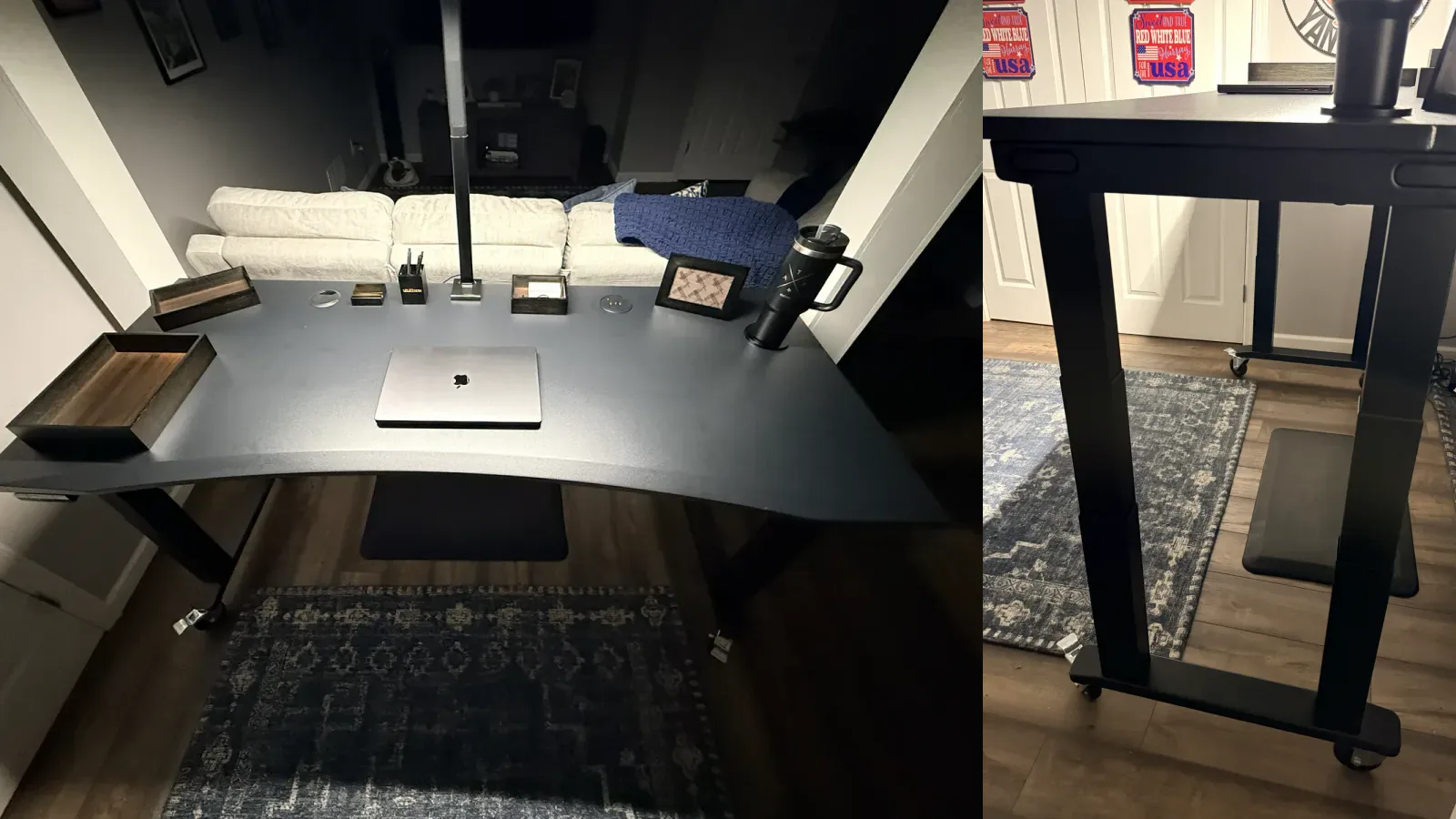
The two-leg V3 coverage describes Matt assembling and using a walnut-laminate configuration with the advanced keypad. The 4-leg review describes a black frame, a 72 by 30 inch Eco Curve top, the Advanced Keypad with USB, and four heavy-duty locking casters. Those are the documented configurations. Observations about caster feel, the flip, and early-use solidity come from that 4-leg review. Observations about two-leg speed, noise, and daily use come from the two-leg review. This page does not add new measurements.
Manufacturer figures are labeled as such. UPLIFT lists 355 lb for the two-leg V3 and 535 lb lifting capacity for the 4-leg, inclusive of desktop weight. Height is 22.6 to 48.7 inches with a 1 inch top on both. Travel speed is listed at 2 inches per second. Noise is listed under 48 dB.
Head-To-Head Specs
| Specification | UPLIFT V3 | UPLIFT V3 4-Leg |
|---|---|---|
| Current price | $599-$939 | $959 |
| Evidence on this site | Existing review and unboxing | Documented hands-on 4-leg review |
| Motors | Dual motor, 3-stage columns | Four synchronized motors, one per leg |
| Listed lifting capacity | 355 lb | 535 lb, inclusive of desktop |
| Height range | 22.6 to 48.7 inches with a 1 inch top | 22.6 to 48.7 inches with a 1 inch top |
| Listed travel speed | 2 inches per second | 2 inches per second, load dependent |
| Listed noise | Less than 48 dB | Less than 48 dB |
| Anti-collision | Six-axis gyroscope system | Stop and reverse, adjustable sensitivity |
| Accessory mounting | 48 threaded frame points | 40 threaded frame points |
| Included cable hardware | FlexMount included | FlexMount Cable Manager and ten cable wraps |
| Keypad in base config | Advanced keypad is a configuration choice | Basic constant-touch keypad; saved presets need an upgrade |
| Desktop sizes | Configurable, 50-plus materials | 48 by 30 up to 80 by 30 inches |
| Advertised warranty | 15 years; optional extension terms apply | 15 years including desktop; optional 25-year extension |
| Standards | ANSI/BIFMA X5.5-2021 | ANSI/BIFMA X5.5-2021 and G1-2013 |
| Best fit | Most home workstations | Wide, equipment-heavy rectangles |
Key Difference: Capacity and Stance
Four legs change the stance and the published lift rating. They do not change the height window.
The two-leg V3 already lists 355 lb. That is more than a typical laptop, monitor, and accessory stack needs. The 4-leg lists 535 lb lifting capacity, confirmed in the existing 4-leg review as the current figure for that model, inclusive of the desktop. Neither number is a load WorkstationSetup recreated for this page.
The 4-leg review describes four 3-stage columns tied by steel feet and crossbar rails, with no lower crossbar between the floor-level feet. That layout is why the 4-leg exists: a wide rectangle that should not feel undersupported. The documented 72 by 30 inch Eco Curve top is the size where that frame stops being extra steel and starts being the point.
Winner for most setups: two-leg V3. Winner when the wide rectangle and 535 lb rating are the reason you are upgrading: V3 4-Leg.
Key Difference: Weight, Footprint, and Handling
The existing 4-leg review is blunt about mass. The frame arrived in two heavy boxes. The completed 72 by 30 inch desk was the heaviest standing desk Matt had assembled. UPLIFT recommends two people for the flip. The review says one person can do it and should not.
The two-leg V3 unboxing and review describe a shorter, single-tool frame build and a desk that is easier to handle. That is the practical cost of staying at 355 lb.
Casters change the 4-leg story after the flip. In the documented 4-leg configuration, the heavy-duty locking casters were a selected accessory, not a default. The review reports smooth travel on a hard floor when unlocked. Do not assume every 4-leg order includes them.
Winner for easier delivery and setup: two-leg V3. Winner if you are committed to a wide four-column desk and will plan the flip: V3 4-Leg.
Key Difference: Accessories, Cables, and Controls
Both frames include FlexMount hardware. The two-leg V3 lists 48 threaded points. The 4-leg lists 40. That is not a reason to pick two legs by itself. It is a reminder that the 4-leg is still an UPLIFT accessory frame, not a bare four-motor table.
Four motors mean four motor cables. The 4-leg review tells you to route those to the control box first, confirm every plug, leave slack for the full height range, then add power and accessories. The two-leg V3 has the simpler underside.
Keypads also differ in the base configuration. The 4-leg ships with a basic constant-touch keypad unless you add an advanced keypad for saved heights. The documented 4-leg setup used the Advanced Keypad with USB. Price the keypad you actually want on both builders.
No universal winner. The two-leg V3 is simpler to wire. The 4-leg stays inside the same accessory family if you need the extra columns.
Is The Price Difference Worth It?
Compare live configured prices: $599-$939 for the two-leg V3 and $959 for the V3 4-Leg. Desktop size, material, keypad, casters, and accessories move both totals. If the two-leg V3 is the pick and you only need the top split, see UPLIFT V3 desktop comparison.
The 4-leg costs more because you are buying two extra motors, more steel, and a higher lifting rating. That spend is worth it when the desktop is wide and the equipment is heavy, or when you want the four-column stance itself. It is not worth it if you are buying capacity you will never use.
The two-leg V3 is the cheaper path to the same height range, the same advertised 15-year coverage, and the accessory system most people need. If a four-motor FlexiSpot is the other tab, use FlexiSpot E7 Plus Max vs UPLIFT V3 4-Leg instead of forcing this page to answer that.
If you want the two FlexiSpot frames against each other instead of this UPLIFT frame split, see FlexiSpot E6 Pro vs E7 Pro. That 1v1 is not a V3 compare. Both desks stay research-backed.
If you want the two-motor E7 Pro against the four-motor E7 Plus Max instead of this V3 vs 4-Leg split, see FlexiSpot E7 Pro vs E7 Plus Max. That page is the 2-motor vs 4-motor FlexiSpot 1v1, not E7 Pro vs V3 and not E7 Plus Max vs V3 4-Leg. Both desks stay research-backed.
Who Should Buy Which
Get the UPLIFT V3 (two-leg) if:
- You want the default workstation frame on this site
- 355 lb and two motors already cover your equipment
- You want fewer heavy boxes and an easier flip
- You want 48 threaded points and FlexMount without four motor cables
Price: $599-$939
Get the UPLIFT V3 4-Leg if:
- You are building a wide rectangular workstation, not a compact desk
- You want four synchronized motors and the 535 lb lifting rating
- You can plan a two-person flip and a cable path for four motors
- You want the documented hands-on 4-leg configuration on this site
Price: $959
Buying Tips
- Start with the two-leg V3 unless the frame is the upgrade. The existing 4-leg review makes the same call.
- Measure the delivery path. A 72 by 30 inch top needs room to stage and flip.
- Add casters on the 4-leg if you will move it. They were a selected accessory in the documented configuration.
- Price the keypad. Saved heights on the 4-leg need an advanced keypad upgrade.
- If the room is an L, use the L-shaped V3 review instead of four legs on a rectangle.
Frequently Asked Questions
Should I buy the UPLIFT V3 or the V3 4-Leg?
Buy the two-leg V3 ($599-$939) for most home offices. Buy the V3 4-Leg ($959) for a wide, equipment-heavy rectangle or when four columns are the reason you are upgrading. This page uses existing on-site coverage. It does not add a new test.
Is the 4-leg more stable than the two-leg V3?
The existing 4-leg review reports a planted early-use feel on a 72 by 30 inch top, with no looseness at the four leg connections Matt assembled. It does not publish an instrumented wobble score and does not load the desk to 535 lb. The two-leg V3 review reports a solid daily workstation, including at standing height. This comparison does not name a lab stability winner.
Do both desks use the same height range?
Yes. UPLIFT lists 22.6 to 48.7 inches with a 1 inch desktop on both, for 26.1 inches of travel. Casters and thicker tops change finished height. Measure around the exact base you order.
Can one person assemble the V3 4-Leg?
The existing 4-leg review says one person can complete the frame and that the flip should still be two people. UPLIFT's manual agrees. The two-leg V3 is the easier solo build.
Does the V3 4-Leg include casters?
Not by default in the documented order. The heavy-duty locking casters were selected in that configuration. Check the builder.
How much do these desks cost?
Configured prices change with the top, keypad, and accessories. Current live prices are $599-$939 and $959.
Testing disclosure: This page cites the existing two-leg V3 review, V3 unboxing, and V3 4-Leg review. It does not add a new assembly, sitting, or standing test of either frame. UPLIFT Desk provided those reviewed configurations at no cost.
Related Guides
- UPLIFT V3 Standing Desk Review: Existing two-leg coverage
- UPLIFT V3 Standing Desk Unboxing: Two-leg assembly walkthrough
- UPLIFT V3 4-Leg Standing Desk Review: Documented hands-on four-column configuration
- Which UPLIFT Standing Desk Is Right for You?: Full frame selector
- FlexiSpot E7 Pro vs UPLIFT V3: Two-leg FlexiSpot vs two-leg V3
- FlexiSpot E6 Pro vs E7 Pro: Research-backed E6 Pro vs the current E7 Pro, not vs V3
- FlexiSpot E7 Pro vs E7 Plus Max: Two-motor E7 Pro vs four-motor E7 Plus Max, not vs V3
- FlexiSpot E7 Plus Max vs UPLIFT V3 4-Leg: Four-motor FlexiSpot vs the 4-leg
- UPLIFT Desk Desktop Guide: How the top changes price and feel
- UPLIFT V3 Desktop Comparison: Laminate vs bamboo vs solid wood on the two-leg builder
- Best Ergonomic Desk Setup: Build the rest of the workstation
- Best Standing Desks Under $700: Budget-first desks, including the FlexiSpot E6 Pro